
Youth Monthly Rent Special Support Application Targets & Eligibility Requirements Core Check
Before clicking the online application button on Bokjiro, the very first thing you need to check is: “Do I meet the eligibility criteria?” Even if you prepare the documents perfectly, if you fail to meet the basic eligibility criteria, your application may be rejected right away during the screening stage. Here is an easy-to-understand breakdown of the core requirements divided into four categories: age, residence, income, and assets.
① Age and Residence Requirements
- Age: Youth aged 19 to 34 (based on the application year)
- Residence condition: Non-homeowner youth residing at a separate address from their parents
- Housing criteria:
- Residing in a housing unit with a deposit of 50 million KRW or less and a monthly rent of 700,000 KRW or less
- Even if the monthly rent exceeds 700,000 KRW, support is available if the sum of the converted monthly rent deposit amount (applying a 5.5% conversion rate) and the monthly rent amount is 900,000 KRW or less
- Moving-in report (Jeonip singo) is mandatory. You must be moved in to your actual residence on the resident registration certificate.
💡 Tip on the Independent Household Criteria from the Original Family
Youth who are aged 30 or older, married (or divorced), single parents, or earn a regular income of 50% or more of the standard median income and maintain a substantially independent livelihood are recognized as a separate household from their parents (youth single household), and screening for the original family is exempted.
② Income and Asset Requirements (Youth Household vs. Original Family Household)
Youth Monthly Rent Special Support evaluates not only the household the youth belongs to, but also the income and assets of the parents’ household (original family) according to the independence criteria.
| Category | Target Members | Income Standard | Asset Standard |
|---|---|---|---|
| Youth Household | Youth applicant + spouse + direct descendants (children), etc. | 60% or less of standard median income | Total assets of 122 million KRW or less |
| Original Family Household | Youth household + parents (direct ascendants) | 100% or less of standard median income | Total assets of 470 million KRW or less |
The recognized income amount is calculated by summing earned income, business income, property income, etc., and deducting basic deductions.
③ Support Details and Excluded Targets
- Support amount: Up to 200,000 KRW per month within the scope of the actual monthly rent paid (disbursed in installments for up to 12 to 24 months)
- Payment method: Monthly cash transfer to an account under the applicant’s own name (for Housing Benefit recipients, only the difference after deducting the Housing Benefit amount is paid)
- Excluded from application:
- Homeowners (including housing sales rights and presale subscription rights)
- Those renting a house owned by immediate family members within the 2nd degree of kinship, such as direct ascendants, brothers, or sisters
- Residents in public rental housing (permanent, national, Happy Housing by LH, SH, etc.)
- Those already receiving similar housing support benefits, such as local government youth monthly rent support programs
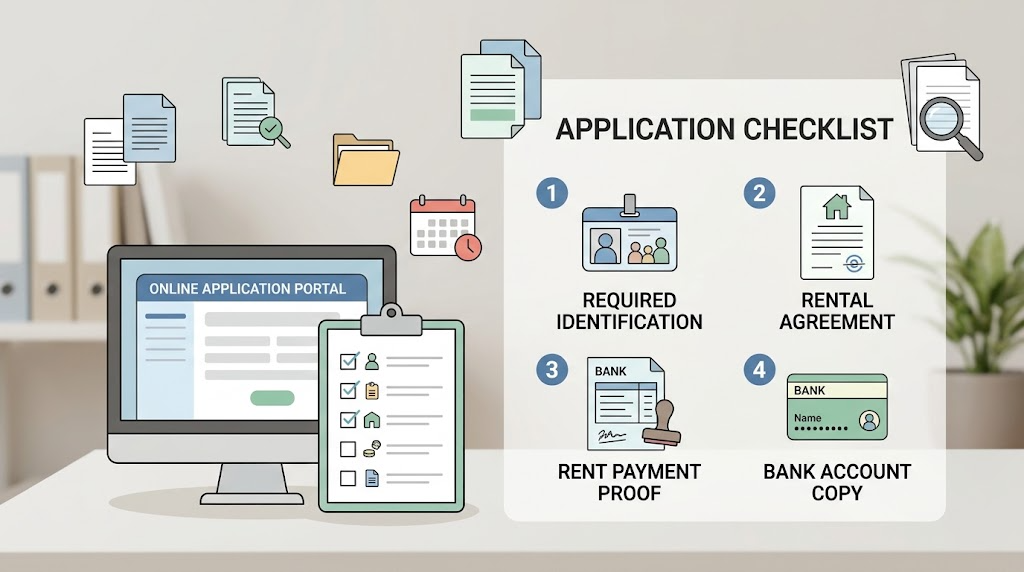
[Required] Documents You Must Prepare for Bokjiro Online Application
When proceeding with the online application on Bokjiro, the stage that causes the most delays is the ‘document attachment’ section. If even a single document does not meet the standards, a ‘request for supplementation’ will be issued, potentially pushing back the payment date by several weeks.
Here is a detailed guide to the 4 essential documents that you must prepare in advance as PDF or clear image files before starting the application.
① Copy of Lease Agreement
This is the core document proving the contract status of the housing in which you currently reside.
- Required details:
- Personal details of the lessor (landlord) and lessee (applicant)
- Address of the leased property, contract period, deposit amount, and monthly rent amount
- Seal/signature of the licensed real estate agent or direct transaction contract seal/signature
- Checkpoints:
- A fixed date (Hwakjeong-ilja) stamp must be on the agreement, or a Housing Lease Agreement Report Certificate must be provided together.
- If it is difficult to receive a fixed date (Gosiwon, dormitory, etc.), it must be replaced with a room occupancy certificate and documents with lease validity.
- If the contract has been automatically renewed (implied renewal), attaching text message records confirming the extension or a confirmation letter along with the existing agreement will help prevent rejection.
② Proof of Monthly Rent Transfer (Recent 3 Months)
This is evidence proving that you are genuinely and faithfully paying the monthly rent.
- Accepted documents:
- Account transfer confirmation certificate / remittance confirmation certificate issued by a banking app (PDF download recommended)
- Transaction history confirmation certificate issued at a bank teller
- Monthly rent payment receipt issued by the landlord (bank transfer receipt, etc.)
- Precautions:
- Simple screen captures (mobile banking screens where balance or transaction history is cropped) may be reasons for rejection. It is safest to download a formal ‘transfer confirmation certificate’ bearing the bank’s seal.
- Sender (youth applicant), recipient (landlord’s account on the lease agreement), transfer amount, and transfer date must be identifiable at a glance.
- If you are a new tenant and do not yet have 3 months of transfer records, submit the recent 1 to 2 months of transfer records paid as of the application date along with move-in confirmation documentation.
③ Copy of Bank Account Under Applicant’s Own Name
This is a copy of the account to which monthly rent support will be deposited every month once finalized and approved.
- Standard: Must be a deposit/withdrawal bank account under the youth applicant’s own name. (Savings/housing subscription accounts are not allowed; parents’ accounts are not allowed)
- How to obtain: Use the [Account Management] → [Save/Issue Bankbook Copy] function in mobile banking apps (Toss, KakaoBank, commercial banks, etc.) to easily save it as an image (JPG/PNG) or PDF.
④ Family Relation Certificate (Detailed Certificate)
This is a mandatory document required for the composition of members and the income/asset screening of the youth household and original family household (parents).
- Issuance standard:
- Must be issued as a ‘Detailed Certificate’. (Issuing a general certificate will result in a request for supplementation)
- Must be printed/saved in the ‘Fully Disclosed’ format showing all final 6 digits of the Resident Registration Number.
- In addition to the family relation certificate based on the youth applicant, depending on the situation, a family relation certificate based on the parents may also be required, so it is safe to issue both.
- Issuing agency: Supreme Court Electronic Family Relationship Registration System (free online issuance)
📌 Final Checklist Before Submitting Required Documents
| Document Name | Issuing Agency | Mandatory Checklist Items |
|---|---|---|
| Lease Agreement | Self-retained / Community Center | Whether a fixed date stamp or lease report certificate is included |
| Monthly Rent Transfer Confirmation | Bank App / Internet Banking | Last 3 months, specifying transfer details sent to landlord’s account |
| Copy of Bank Account | Bank App | Verification of checking/savings account under the youth applicant’s own name |
| Family Relation Certificate | Supreme Court Electronic Family Relationship Registration System | Detailed issuance + full disclosure of the back digits of the Resident Registration Number |

[Applicable Applicants Only] List of Additional Documents Required
In addition to the four essential documents examined above, local governments often request additional supporting materials depending on the housing type, household circumstances, or application by proxy. If your current living situation differs from a typical Jeonse/monthly rent studio or officetel contract, be sure to review the list below and gather the documents in advance to obtain approval quickly without supplementation procedures.
① Residents of Gosiwons, Dormitories, and Guesthouses
Applies to cases where drafting a typical housing lease agreement is difficult, or moving-in reporting and obtaining a fixed date are challenging in multi-use facilities.
- Submission documents:
- Room Occupancy Certificate (or Dormitory Move-in/Move-out Confirmation): Must specify the facility representative’s official seal (stamp), occupancy period, room number, and monthly fee.
- Documents proving lease validity: Copy of business registration certificate of the Gosiwon/dormitory, monthly fee payment receipt## [Applicable Applicants Only] List of Additional Documents Required
This is a representative list of additional documents fundamentally required by reviewing agencies depending on individual circumstances (income verification, housing type, family relations, etc.) in addition to the basic documents.
| Category | Target Condition | Mandatory Additional Documents | Issuing Agency / Precautions |
|---|---|---|---|
| Income & Employment | Freelancers & Special Employment Workers | Certificate of Appointment, Certificate of Income Amount, Withholding Tax Receipt for Business Income | Affiliated workplace / NTS Hometax |
| Business Registrants | Certificate of Business Registration, Certificate of Value Added Tax Taxable Base | NTS Hometax, Gov24 | |
| Non-income Earners & Retirees | Certificate of Fact (Total Settlement / No Report Fact), National Health Insurance Qualification Loss Confirmation Certificate | Hometax, National Health Insurance Service | |
| Housing & Lease | Jeonse & Monthly Rent Residents | Copy of Lease Agreement with Fixed Date, Down Payment Receipt | Community Center, Internet Registry Office |
| Rent-Free Residents | Rent-Free Lease Confirmation, Seal Certificate of Homeowner (or copy of ID) | Use agency template | |
| Family & Identity | Those Needing to Clarify Household Separation and Family Relations | Resident Registration Abstract (including entire address change history), Family Relation Certificate (Detailed) | Gov24, Supreme Court Electronic Family Relationship Registration System |
| Multi-child & Single-parent Families | Marriage Relation Certificate (Detailed), Basic Certificate (Detailed) | Supreme Court Electronic Family Relationship Registration System | |
| Preferential & Special Cases | Vulnerable Groups & Welfare Beneficiaries | Certificate of Basic Living Recipient, Near-Poverty Class Confirmation, Certificate of Disabled Person | Gov24, Bokjiro, Community Center |
- Issuance Precautions: All supporting documents must be issued within the last 1 month (or 3 months) as of the application date, and must be printed in the ‘Detailed’ format exposing all 13 digits of the Resident Registration Number to prevent rejection.
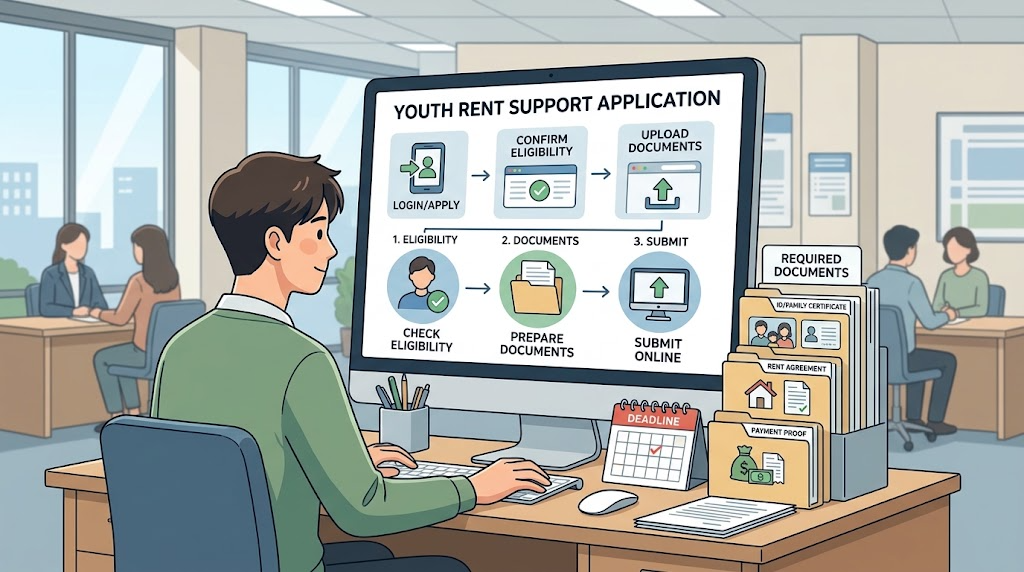
Bokjiro (PC/Mobile App) Online Document Upload Practical Tips
Even if you have gathered the documents perfectly, cases where documents are rejected because they do not meet specifications or cannot be identified during the upload process to the Bokjiro system are frequent. Because local government officials inspect the documents visually and register them in the computer network, the key is to upload “files that can be clearly read at a glance.”
Here are practical online upload tips you must know before applying.
① Comprehensive Summary of Online Free Issuance Sources for Required Documents
Without visiting a community center in person, you can instantly receive most documents for free via government public portals and download them as PDFs.
- Family Relation Certificate (Detailed): Access Supreme Court Electronic Family Relationship Registration System → Certificate Issuance → Must select ‘Detailed Certificate’ and Resident Registration Number ‘Full Disclosure’, then save as electronic document (PDF)
- Resident Registration Certificate / Abstract: Access Gov24 → Resident Registration Certificate Issuance → Print as PDF after configuring settings to show all household member names, move-in dates, and Resident Registration Numbers
- Monthly Rent Transfer Confirmation: Access mobile banking app of each bank → [Transfer History] or [Customer Center/Certificates] → Issue and save ‘Transfer Confirmation (Remittance Confirmation)’
- Copy of Bank Account: Save as image file (JPG/PNG) via [Account Settings] → [Save Bankbook Copy] in Internet banking/mobile app
② File Format and Size Limit Guide
The Bokjiro system has restrictions on attachment file sizes and extensions. If they do not meet the standards, errors will occur during upload or files will not be saved.
| Item | Recommended Standard | Precautions |
|---|---|---|
| Supported Extensions | PDF, JPG, PNG | HWP, ZIP, HEIC (iPhone high-efficiency photo) files cannot be registered or will cause viewing errors |
| File Size | 10MB or less per file | Beware of exceeding file size when merging multiple documents (compression tools recommended) |
| File Naming Convention | Minimize spaces and special characters | Clearly specify in the format of, for example: LeaseAgreement_HongGildong.pdf, MonthlyRentTransferHistory3Months_HongGildong.pdf |
💡 Essential Check for iPhone (iOS) Users!
When taking photos of documents with the default iPhone camera, the default extension is often saved as HEIC. Since HEIC files cannot be opened in the Bokjiro computer system and will cause a request for supplementation, go to [Settings] → [Camera] → [Formats] to switch to ‘Most Compatible (JPEG)’ before taking photos, or convert photos to PDF before attaching.
③ 3 Rules to Prevent Rejection When Taking Photos with a Smartphone
When you do not have a scanner and photograph paper documents with a smartphone camera to upload them, keeping just these three things in mind can reduce the rejection rate to 0%.
- Eliminate shadows and light reflections: When photographing directly under fluorescent lighting, use a slight zoom (2x) from an angle to shoot flat so that the shadow of your hand or smartphone does not obscure the text.
- Secure a 4-corner frame: If the edges of the document are cropped, it will be rejected due to suspicion of forgery/alteration or missing stated items. Leave margins so that all 4 corners of the A4 paper fit within the screen.
- Use the smartphone’s built-in ‘Document Scan’ feature:
- Galaxy (Samsung): Pointing at the document with the default camera activates the yellow [T Scan] button to neatly save it as a document format without distortion.
- iPhone (Apple): Open [Notes] app → Camera icon → Tap [Scan Documents] to instantly create a high-definition PDF with grid correction.
④ Convenience Comparison: PC vs Mobile App (Bokjiro) Application
- PC Web Application Recommended: You can organize multiple PDF files by folder and drag-and-drop attach them all at once, resulting in fewer errors and easier checking for misentries.
- Mobile App Application Recommended: Useful when you want to immediately take photos of physical paper documents and upload them right away, but since there is a risk of sessions dropping during large file transfers depending on connection quality, proceeding in a Wi-Fi environment is recommended if possible.

TOP 3 Most Frequent Rejection Reasons & Q&A
Just because you uploaded all documents and received an application completion text message does not mean it is over. If you receive a ‘request for supplementation’ due to falling short of regulations or incomplete documents during local government computer reviews, payment approval may be delayed by more than a month until supplemental documents are resubmitted and reviewed.
Here are the top 3 representative rejection reasons actual applicants encounter most often, along with core questions and answers (Q&A) that are easy to confuse.
⚠️ TOP 3 Most Frequent Rejection Reasons
#1 Rejection Reason: Family Relation Certificate issuance option error (General type / Resident registration number masked submission)
This is the item that gets flagged the most. It must be a ‘Detailed Certificate’, and the back digits of the Resident Registration Number must be issued with ‘Full Disclosure’ so household members can be looked up. If submitted in the system default ‘General’ state or ‘Date of birth only disclosed’ state, a request for supplementation will occur 100% of the time.
#2 Rejection Reason: Inadequate monthly rent transfer proof (Simple transaction history capture / Remittance in a third party’s name)
Simple mobile banking balance screens or text capture images are not recognized as official proof. It must be an official ‘account transfer confirmation certificate’ bearing a bank seal. Furthermore, if sent to an account other than the landlord’s account on the lease agreement, or sent under a family member’s name instead of the applicant’s own name, it will be rejected unless explanatory materials (power of attorney, family relationship verification, etc.) are provided.
#3 Rejection Reason: Missing official lease agreement certification and mismatched address
This occurs when uploading only the original contract and omitting the fixed date stamp or Housing Lease Agreement Report Certificate. In addition, if the move-in date on the resident registration certificate and the residential address on the contract differ even slightly (differences in building/unit number notations, etc.), supplementation orders will be issued during computer verification.
❓ Frequently Asked Questions (FAQ)
Q1. A fixed date is not stamped on the lease agreement. Is it completely impossible to apply?
A. Even if there is no fixed date stamp on the agreement, if you attach the ‘Housing Lease Agreement Report Certificate’ issued through a community center or the Real Estate Transaction Management System, it will be equally recognized. If you reside in a facility not subject to fixed date granting, such as a Gosiwon or dormitory, you may submit a room occupancy certificate, a copy of the business registration certificate, and a usage fee payment receipt as substitute documents instead of a fixed date.
Q2. Monthly rent was sent directly to the landlord from an account under my parents’ name. Can this history be recognized?
A. In principle, only transfers made from an account under the youth applicant’s own name to the landlord’s account are recognized. If unavoidably transferred from a parents’ account, you can receive recognition by submitting to the local government official an additional written explanation proving the reason, along with “deposit/withdrawal transfer history showing the youth transferred that amount to the parents” in addition to the simple transfer details.
Q3. The contract period on the existing contract has already passed due to implied renewal (automatic extension). Do I need to write a new contract?
A. You do not need to rewrite it. It will be normally accepted if you explain the implied renewal status by attaching the previous lease agreement (including fixed date) together with a capture of agreed contract renewal text messages exchanged with the landlord or recent monthly rent transfer history (confirmation showing remittances continuing under the same terms as before).
Q4. It is a monthly rent with deposit, but maintenance fees are billed separately. Are maintenance fees also included in the support grant?
A. Only pure monthly rent (rent) is eligible for support. Maintenance fees (water, electricity, gas, internet, cleaning fees, etc.) are excluded when calculating the actual monthly rent support amount, and actual expenses are paid within the limit of up to 200,000 KRW per month based on the pure rent.
To conclude writing this post, select the next action:
Generate epilogue and Naver Blog Search Engine Optimization (SEO) title
Compile the entire article into a finalized version for copying and pasting to a blog
Korean version: 한국어로 읽기