Prologue: Can Adult Children Apply for Their Parents’ Welfare Benefits Online?
“I heard my parents might be eligible for the Basic Pension or care services, but how do I apply?”
“I don’t have time to visit the Community Service Center during weekday daytime hours, and my parents find it difficult just looking at a smartphone screen…”
As parents grow older, many people want to make sure they receive the senior welfare benefits provided by the state, but feel at a loss due to busy daily schedules and physical distance. It also doesn’t feel right to tell elderly parents who have mobility challenges or are unfamiliar with digital devices to “go visit the Community Service Center in person.”
To give you the conclusion first: adult children can apply online directly on behalf of their parents.
By using ‘Bokjiro,’ the welfare portal of the Ministry of Health and Welfare, you can easily complete an application as a representative via PC or mobile from home or the office, without taking time off work to accompany them to the Community Service Center.
| Traditional In-Person Visit to the Community Service Center | Online Representative Application via Bokjiro |
|---|---|
| • In-person visit required during weekday operating hours (09:00–18:00) | • Available 24 hours a day, regardless of weekends or nighttime |
| • Travel and waiting times incurred when accompanying parents | • Fast application from home or work using simple authentication |
| • Inconvenience of having to revisit if documents are missing | • Instantly attach required documents via smartphone photos or scanned files |
However, because this is an administrative procedure dealing with parents’ personal information, bank accounts, and welfare qualifications, applications are rejected more often than you might think if the representative’s identity verification method or mandatory documents (such as family relationship certificates or powers of attorney) are not properly prepared.
What should you prepare in advance to get approved on the first try without wasting time? We will walk you through everything clearly step by step, from representative eligibility to mandatory documents and helpful submission tips.
Shall we continue writing the next section right away?

Who Can Apply on Their Behalf? (Representative Eligibility and Scope)
This is the body text for section 2, written using a table and checkpoints so that Naver blog readers can understand the eligibility requirements at a glance.
- Who Can Apply on Their Behalf? (Representative Eligibility and Scope)
“Can only sons or daughters apply on their behalf?”
“Can a daughter-in-law, son-in-law, or grandchild also apply online for them?”
The very first thing you need to verify is ‘whether I fall within the legally recognized scope of a representative.’ Because welfare benefits and services represent significant individual rights and involve taxpayer funds, relevant laws and regulations (such as the Act on the Use and Provision of Social Security Benefits) clearly define the scope of representatives so that not just anyone can apply on someone else’s behalf.
Here is a summary of the main representative qualifications and scope recognized by the online Bokjiro system.
📌 Persons Eligible to Submit an Online Application as a Representative
| Category | Representative Scope and Relationship | Notes and Verification Criteria |
|---|---|---|
| Family and Relatives | • Spouse, direct blood relatives (children, grandchildren, parents, etc.)
• Blood relatives within the 8th degree of kinship, relatives by marriage within the 4th degree of kinship |
Relationship must be verified via a family relationship certificate, etc. |
| Legal Representative | • Legally designated representatives, such as adult guardians or limited guardians | Submission of a Certificate of All Matters of Guardianship Registration required |
| Public Officials and Practitioners | • Public officials in charge (ex officio application)
• Social welfare facility staff, etc. (under special delegation) |
Mainly carried out ex officio by Community Service Centers or through separate official document procedures |
💡 Frequently Asked Question: Are daughters-in-law or sons-in-law also eligible?
Yes, they are eligible! Legally, sons-in-law and daughters-in-law correspond to ‘relatives by marriage in the 1st degree of kinship,’ which falls within the representative scope (relatives by marriage within the 4th degree of kinship). However, when submitting family relationship certificates, you must provide documentation so that the connection between the parents and the applicant is clearly verified.
⚠️ Restrictions to Check Before Applying as a Representative
- Simple acquaintances or neighbors are not permitted
No matter how close a relationship you have with the parents, simple acquaintances, neighbors, or informal caregivers who do not have a legal kinship relationship are not eligible to apply online as a representative.
- Representative Eligibility Differs by Service
Depending on the specific welfare service you wish to apply for (e.g., Basic Pension, Tailored Care Service for Older Adults, Emergency Safety & Care Service, etc.), the permitted scope for online representative application may vary slightly. Most general family members (children, spouses) are eligible, but if extending to the scope of relatives, you must check the detailed application requirements for the respective service on the screen once more.
- Verification of Parents’ ‘Mental Capacity’ and Consent
Representative applications are predicated on the parents’ delegation (consent). If you apply arbitrarily without a power of attorney, administrative processing may be canceled immediately or legal issues may arise, so you must prepare the parents’ prior consent and signature/seal.
Once your eligibility is confirmed, it is time to prepare the mandatory required documents to submit without rejection.
Shall we continue writing the next step?
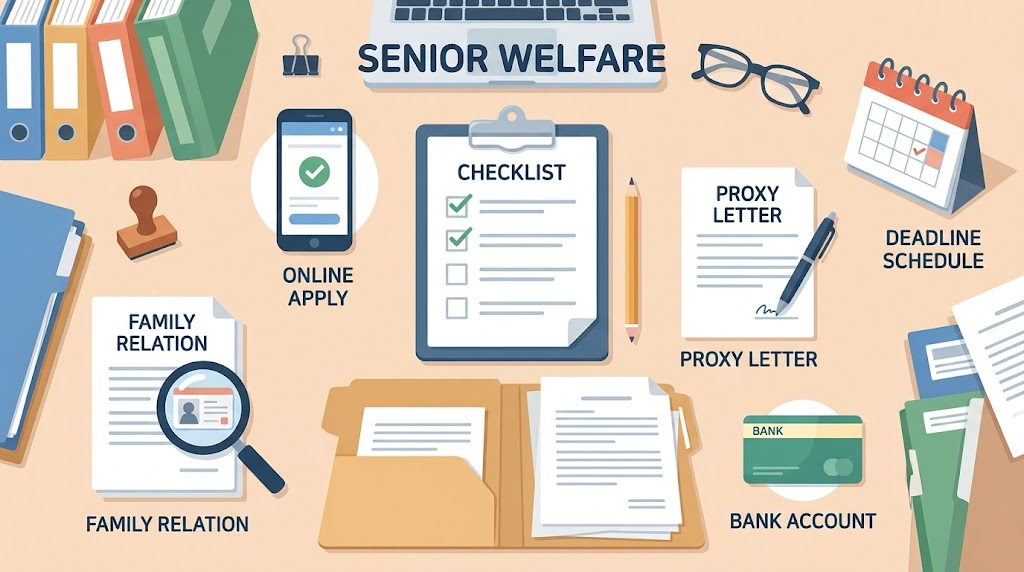
Mandatory Required Documents to Prepare Before Applying
As Naver blog readers make the most mistakes during the document preparation stage, this is the body text for section 3, thoroughly detailing issuance options and writing tips that are easy to confuse.
- Mandatory Required Documents to Prepare Before Applying
“I accessed the Bokjiro site and was filling out the application, but because I was missing documents, I had to start over from the beginning…”
This is the most common difficulty experienced by people who have tried applying for welfare online. Because Bokjiro has a security session time limit, if you try to look for documents or have them issued while filling out the form, the session expires and the information you painstakingly entered is easily lost.
Therefore, the key is to save the mandatory document files below (scanned copies or clear photos) in advance to your PC or smartphone before opening the application page.
📋 Representative Application Mandatory Documents Checklist
| Mandatory Documents | Issuing Agency / Preparation Method | Precautions & Checkpoints |
|---|---|---|
| 1. Copy of ID Card (2 copies) | Beneficiary (Eligible Person) & Representative | • Resident registration card, driver’s license, passport, etc.
• Letters must be clear without light reflection |
| 2. Family Relationship Certificate (Detailed) | Supreme Court Electronic Family Relationship Registration System, Gov24, Automated Certificate Issuance Machine | • Must issue a ‘Detailed’ certificate
• Must disclose all back digits of the Resident Registration Number |
| 3. Welfare Benefit Power of Attorney | Bokjiro Form Archive or form within the text | • Delegator’s (parent’s) handwritten signature or registered seal stamp required |
| 4. Copy of Bankbook for Benefit Receipt | Applicable bank app (mobile bankbook copy) or photo of physical bankbook | • In principle, an account under the name of the beneficiary (parent) |
🔍 Key Tips & Precautions by Document
① Family Relationship Certificate Must Be ‘Detailed’ + ‘Disclose Back Digits of Resident Registration Number’
When the Community Service Center officer electronically verifies the relationship between the representative and the subject, if the back digits of the Resident Registration Number are masked, a request for supplement or a rejection will occur 100% of the time. When issuing online, please be sure to check the options for [Detailed] and [Disclose all back digits of the Resident Registration Number].
② Instructions for Completing the Power of Attorney (Caution against Omitting Handwritten Signature)
When applying as a representative on Bokjiro, you must download and complete the standard power of attorney form provided by the system.
- Delegator section: Enter the personal information of the parent who will receive the benefits.
- Representative section: Enter the personal information of yourself applying on their behalf.
- Signature verification: In the delegator signature section, the parent’s handwritten signature or stamp (registered seal) must be affixed. Signatures typed on a computer are not recognized as valid. Please print it out in advance, obtain the signature, and take a photo of it.
③ Criteria for Registering Bankbook Copy
In principle, the account to receive the Basic Pension or various allowances must be under the parent’s own name.
- Exceptional cases: In special situations where the parent lacks mental capacity due to dementia, brain lesions, etc., or has bad credit, or requires a seizure-protected dedicated account (Happiness Keeper Account), it may be possible to designate a proxy receipt account in the name of an immediate family member; however, because separate supporting documents and an on-site inspection are required in such cases, confirmation with the competent Community Service Center is essential.
Once all documents are prepared in image file formats (JPG, PNG) or as a PDF, it is time to officially begin the application on the Bokjiro site.
Shall we continue writing the next step?

Step-by-Step Procedure for Representative Application via Online Bokjiro
This is the body text for section 4, combining step-by-step action guidelines and visual instructions so that Naver blog readers can follow along smoothly while looking at their mobile or PC screens.
- Step-by-Step Procedure for Representative Application via Online Bokjiro
If all documents are prepared, it is now time to access Bokjiro (PC website or mobile Bokjiro app) and proceed with the application.
We have organized this into a 5-step standard procedure so you can follow along step by step while looking at the screen.
💻 Bokjiro Representative Application 5 Steps at a Glance
| Step | Main Tasks | Essential Checkpoints |
|---|---|---|
| STEP 1 | Access Bokjiro and Log In | Log in with the representative’s own simple certificate |
| STEP 2 | Search Services and Select Application | [Apply for Welfare Services] > [Apply for Welfare Benefits] > Check the target service |
| STEP 3 | Enter Applicant/Representative Information Separately | Check the ‘Representative Application’ option and enter parent’s (beneficiary’s) information |
| STEP 4 | Attach Required Document Files | Upload power of attorney, family relationship certificate, and ID card copy |
| STEP 5 | Final Submission and Confirmation of Application Receipt | Note the ‘Application Receipt Number’ after completing online application submission |
🔍 Detailed Step-by-Step Guide
STEP 1. Log In Under the Representative’s Own Name
First, access Bokjiro (bokjiro.go.kr).
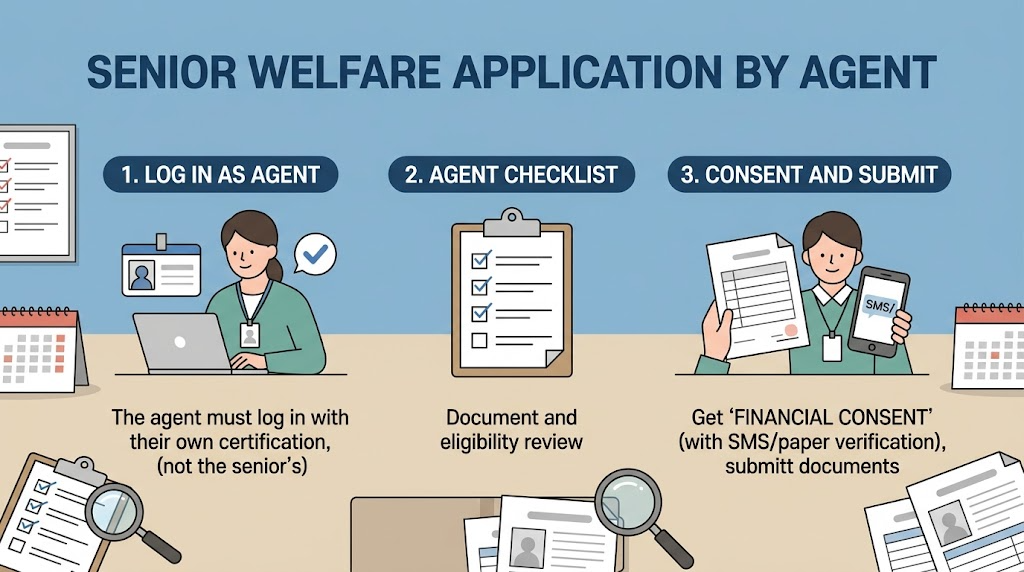
The most important point here is the ‘login entity.’ You must log in not with your parents’ ID or certificate, but with simple authentication (Kakao, Naver, PASS, etc.) or a financial/joint certificate belonging to the representative (child, etc.) applying on their behalf for the representative application screen to open properly.
STEP 2. Select Welfare Service
- From the top menu, go to the [Apply for Welfare Services] ➔ [Apply for Welfare Benefits] menu.
- Find the specific service you wish to apply for (e.g., Basic Pension, Tailored Care Service for Older Adults, etc.) under the Old Age/Senior category.
- Click the [Apply] checkbox on the right side of the corresponding service, then click ‘Save and Move to Next Step’ at the bottom of the screen.
STEP 3. Enter Applicant (Parent) and Representative Information Separately
- In the basic application information input field, you must select ‘Representative Application.’
- Applicant (Beneficiary) Information: Enter the name, Resident Registration Number, actual residential address, and contact information of the parent who will actually receive the benefits.
- Representative Information: Information of the logged-in user is automatically linked or an additional input window appears. Accurately specify the relationship with the recipient (e.g., child, daughter-in-law, etc.).
STEP 4. Upload Prepared Required Documents
Attach the files prepared earlier in Chapter 3 according to each item.
- Recommended upload formats: JPG, PNG, PDF
- Size limit: Usually within 5MB–10MB per file (based on Bokjiro system limits)
- File legibility check: Before uploading, make sure to check via preview that the text (Resident Registration Number, signature) is not blurry or cut off.
STEP 5. Final Submission and Verification of Receipt
After reviewing the application details one final time, click the [Submit] button.
Once the submission is complete, the ‘Online Application Submission Completed’ message along with the receipt number will be displayed on the screen. It is advisable to capture or jot down the number, as it will be needed when checking progress status or inquiring with the Community Service Center later.
The application itself takes only 10 to 15 minutes, but rejections or requests for supplements during the review stage are frequent due to minor errors. In the next chapter, we will take a close look at the 4 most frequent mistakes made during representative applications and their solutions.
Shall we continue writing the next step?
4 Most Common Mistakes & Key Precautions When Submitting as a Representative
This is the body text for section 5, containing “practical tips to prevent rejection” that Naver blog readers are most curious about and can gain real help from.
- 4 Most Common Mistakes & Key Precautions When Submitting as a Representative
“I uploaded all the documents and it said submission was completed, but a few days later, I received a text message from the Community Service Center saying the documents were rejected…”
In reality, more than 90% of cases where people receive a request for document supplementation from an administrative officer or have their application canceled after applying as a representative on Bokjiro stem from 4 minor yet fatal mistakes. Be sure to check the 4 points below to prevent the screening period from being delayed and postponing the timing of benefit receipt.
🚨 Frequent Mistakes in Representative Applications & Solutions
| Major Mistake Type | Cause of Occurrence | Solution |
|---|---|---|
| 1. Login Certificate Confusion | Attaching own documents after logging in under parent’s name | Log in with the representative’s own certificate, then select representative application mode |
| 2. Omitting Household Member Financial Information Consent | Omitting consent from household members subject to income/asset investigation | Parent’s personal authentication (SMS/ARS) or attaching written consent form |
| 3. Illegible Supporting Documents | Shaky photos, light reflections, missing signatures | Photograph on a flat surface; verify handwritten signature/back digits of Resident Registration Number |
| 4. Mistake Regarding Ineligibility for Online Application | Attempting to apply online for in-person only specialized services | Verify in advance whether the applicable project allows online representative application |
🔍 Detailed Check of 4 Key Precautions
① Confusion Over the Entity of the Login Certificate
This is the most frequent mistake. Thinking “Since it’s my parent’s matter, should I enter under my parent’s name?”, some people log in through authentication via their parent’s mobile phone, and then upload a power of attorney or family relationship certificate.
- Correct method: When proceeding with a representative application in the Bokjiro system, you must log in with the simple authentication or joint certificate belonging to the representative (child, etc.) for the system to properly operate the ‘representative qualification verification’ process. If you log in under the parent’s name, it is regarded as a ‘direct application by the principal,’ resulting in document mismatch errors.
② Omitting Household Member Consent for Provision of Financial Information
Senior welfare services that involve the Basic Pension or income/asset investigations require looking up the income and financial assets of parents (and their spouses).
- While filling out the application, the step for the ‘Request Form and Consent for Notification of Provision of Financial Information, etc.’ appears.
- At this point, if they have a mobile phone under the parent’s name, consent can be processed immediately via text message (SMS) or PASS simple authentication; however, if they use a budget phone (MVNO) or do not have a mobile phone under their own name, online consent is not possible.
- In such cases, you must print the [Written Form of Consent for Provision of Financial Information], obtain the parent’s handwritten signature, and upload it as a scanned or photographed file.
③ Administrative Rejection Due to Illegible Documents
Documents roughly photographed at an angle with a smartphone camera or with the Resident Registration Number or signature washed out by camera flash in a dark room cannot be deciphered by the computer reviewer and are unconditionally rejected.
- Spread the documents flat on the floor and photograph them vertically from above to avoid casting shadows.
- In particular, you must verify via preview before sending whether the ‘back digits (13 digits total)’ of the Resident Registration Number on the family relationship certificate are clearly visible, and whether the ‘delegator’s (parent’s) signature’ on the power of attorney is an actual signature (or registered seal) rather than typed text.
④ Checking If It Is an Exception Item Requiring In-Person Application Only
While online representative application is supported for most major senior welfare programs (Basic Pension, Tailored Care Service for Older Adults, etc.), there are cases where specialized projects by local governments, special vouchers based on Long-Term Care insurance grade determinations, and some in-kind support programs are permitted only through in-person applications at the competent Eup/Myeon/Dong Community Service Center.
- First check whether an ‘Online Application Available’ icon is attached to the item you wish to apply for in the Bokjiro service list. If it is classified as in-person only, online representative application itself is impossible, so you must visit the Community Service Center with your documents.
Just thoroughly checking and addressing these four points increases the likelihood of getting approved on the first try without requests for supplementation by over 99%. In the next chapter, we will look at how to look up the processing status after application and tips on handling potential requests for supplementation.
Shall we continue writing the next step?

Tracking Progress After Submission and How to Handle Requests for Supplementation
This is the body text for section 6, written in the format of a practical manual to relieve anxiety experienced during the administrative review process after completing submission and to respond calmly to supplementation requests from the person in charge.
- Tracking Progress After Submission and How to Handle Requests for Supplementation
“I’ve finished submitting the application, but is it being processed properly right now?”
“I received a text message from the Community Service Center asking me to resubmit documents, so how should I upload them?”
Completing the application on online Bokjiro does not mean that all procedures are finished. This is because the documents are routed through the Bokjiro system and assigned to the public official in charge at the competent Eup/Myeon/Dong Community Service Center (Administrative Welfare Center) of the parents’ resident registration address, and the actual eligibility review begins.
Here is a summary of how to check the progress status after application and tips on handling requests for supplementation calmly without panicking when contacted.
📱 How to Check Application Progress in Real Time
You can check the current administrative processing stage at any time on the Bokjiro website or mobile app.
[Log in to Bokjiro] ➔ [My Page] ➔ [Welfare Service Application Status] ➔ Check Application History
| Processing Status Stage | Meaning by Status | Notes and Action Guidelines |
|---|---|---|
| Submission Completed (Awaiting Receipt) | The application has been successfully registered in the Bokjiro system | Stage before electronic transfer to the competent local government |
| Receipt Completed (Review in Progress) | The Community Service Center officer has received and is reviewing documents | Electronic investigation stage for income/assets and eligibility criteria |
| Supplementation Requested | Documents are illegible, missing, or require additional explanation | Mandatory submission of additional documents within the announced deadline |
| Processing Completed (Approved/Rejected) | Final review has ended and the welfare benefit determination is complete | Determination notice sent (SMS/Mail) |
⚠️ What If You Receive a ‘Supplementation Requested’ Text? Practical 3-Step Response
If there is an issue with submitted documents or additional proof is needed during the screening process, an instructional text message (or phone call) from the officer in charge will arrive on the representative’s or parent’s mobile phone. There is absolutely no need to panic.
Step 1: Accurately Note the Reason for the Request
The commonly occurring reasons for supplementation are clear.
- “The back digits of the Resident Registration Number on the family relationship certificate are masked, so please resubmit.”
- “The power of attorney signature is missing, so please upload again after providing a handwritten signature.”
- “Please add a confirmed date verification copy of the lease agreement.”
Check what requested document is specified in the text message and when the submission deadline is.
Step 2: Utilize the Online ‘Submit Supplementary Documents’ Feature on Bokjiro
There is no need to visit the Community Service Center in person to resubmit documents.
- After logging in to Bokjiro, go to [My Page] ➔ [Welfare Service Application Status].
- The status of the relevant application will have changed to [Supplementation Requested], and the [Submit Supplement] button on the right will be active.
- Take another clear photo of the requested document, attach it, and click submit to complete the process.
Step 3: Reconfirm with the Officer in Charge via Phone Call
Once you have uploaded supplementary documents online, it is advisable to make a phone call to the welfare officer at the competent Community Service Center listed as the text sender number and say, “I am the child (representative) of applicant OOO, and I have completed the electronic registration of supplementary documents. Please verify them.” This ensures that the review process resumes immediately without any omissions.
📬 How Is the Final Result Notified?
- Processing time required: In principle, it is usually processed within 30 days from the date of application receipt; however, in cases such as the Basic Pension where income and asset investigations are complex, it may take up to 60 days.
- Notification method: Depending on the method selected during application, whether benefit eligibility has been granted and the scheduled date of the first benefit payment will be detailed via notification talk (SMS) or postal mail (decision notice).
Now finally, let us move on to the epilogue and final checklist summarizing the entire content at a glance.
Shall we continue writing the final closing?
Epilogue: Passing on the First Try Without Rejection Through Meticulous Preparation
This is the epilogue (closing) section text, neatly wrapping up the entire article and providing a checklist for readers to make a final review right before applying, along with warm words of encouragement.
- Epilogue: Passing on the First Try Without Rejection Through Meticulous Preparation
Looking into welfare benefits for parents and personally preparing an application as a representative takes more effort and requires attention to quite a few details than one might expect. If you are not typically familiar with administrative terminology or computer systems, the Bokjiro screen itself may feel unfamiliar.
However, if you prepare the documents step by step and apply according to the criteria, it can become the most reliable act of filial piety, sparing parents with mobility difficulties the trouble of visiting crowded government offices in person.
Lastly, right before clicking the submit button, make sure to check if anything is missing using the ‘Final Checklist Right Before Representative Application’ below.
✅ Final Checklist Right Before Representative Application
[ ] Representative Authentication: Did you log in with the representative’s (child, etc.) own certificate, not under the parent’s name?
[ ] Family Relationship Certificate: Is it a ‘Detailed’ certificate rather than a general one, and are all 13 digits of the Resident Registration Number disclosed?
[ ] Power of Attorney Seal/Signature: Is the parent’s handwritten signature or stamp (registered seal) clearly included?
[ ] Bankbook Copy: Is the account to receive benefits confirmed to be under the parent’s (beneficiary’s) own name?
[ ] Photo Legibility: Are the photographed document files free of shadows, light reflections, or cut-off text?
[ ] Financial Information Consent: Was parent mobile phone authentication or the attachment of a written consent form not omitted?
Senior welfare benefits provided by the state and local governments are “rights that can only be received if you apply.” Since there are many benefits that are not applied retroactively if the application is delayed, we encourage you not to put it off and to look after them thoroughly using the procedures explained today.
If you have any confusing parts or special situations during the application process, leaving questions in the comments, contacting the Health and Welfare Call Center (☎ 129 without area code), or inquiring with the welfare team at the competent Administrative Welfare Center will help you receive more accurate guidance.
Shall we proceed to the next steps for blog publishing?
Recommendation of Search Engine Optimization (SEO) title candidates for Naver Blog
Generation of AI thumbnail/image generation prompts matching the body text
Korean version: 한국어로 읽기