
Essential Check Before Course Application: Verifying Card Status & Support Limit
Just because you applied for and received issuance approval for the Tomorrow Learning Card does not mean you can immediately take courses. Act### 1. Essential Check Before Course Application: Verifying Card Status & Support Limit
Just because you have been issued the Tomorrow Learning Card does not mean you can take all lectures for free right away. Prior to full-fledged course application, checking physical card activation status, your account’s support limit, and the validity period in advance will prevent you from being flustered by payment errors or support cancellations during the course registration stage.
- Checking Physical Card Receipt and Payment Account Linkage
If you attempt payment right away looking only at the mobile card number after completing the issuance application on Work24, approval is often denied.
- Confirm Physical Card Receipt: You must check whether you have properly received and completed registration for the physical debit or credit card from the partnered card company (Shinhan Card or NH Nonghyup Card) selected during the issuance application.
- Check Linked Account Balance: When paying government-subsidized training costs with the Tomorrow Learning Card, unless it is a completely free course, out-of-pocket expenses (copayments) are immediately withdrawn from the payment account linked to the card. It is essential to verify before payment that the minimum copayment amount is available in that bank account.
- How to Check Remaining Support Limit and 5-Year Validity Period
Basically, the Tomorrow Learning Card supports training costs from 3,000,000 KRW up to a maximum of 5,000,000 KRW per person over 5 years.
- Work24 Limit Check Path: Log in to Work24 → My Page → Vocational Competency Development → Tomorrow Learning Card Issuance/Support History menu to view your real-time balance.
- Eligibility for Additional Support (1,000,000 to 2,000,000 KRW): Basic livelihood security recipients, the near-poverty group, non-regular workers, residents of employment crisis areas, etc., can apply for additional support of up to 2,000,000 KRW after fully exhausting the basic 3,000,000 KRW limit, so review your eligibility requirements in advance.
- Check Validity Period: Valid for exactly 5 years from the card issuance decision date. When the period expires, any remaining balance is automatically forfeited, so you should utilize it intensively before the expiration date.
- Copayment Rate Calculation Criteria by Occupation and Course Type
The government support rate is not identical for all courses. The percentage individuals must bear varies significantly depending on the employment rate of the training occupation and the nature of the course.
| Course Type | Government Support Rate & Copayment Standard | Characteristics |
|---|---|---|
| K-Digital Training (KDT) | 0 KRW copayment (Fully government-supported) | Completely free for the first enrollment, additional monthly training incentive paid |
| National Core and Strategic Industry Training | 0 KRW copayment (Fully government-supported) | Courses centered on core base industries such as manufacturing and design |
| High-Performing Occupations with Employment Rate of 70% or Higher | Around 15% to 25% copayment rate | Popular fields with high employment linkage such as accounting, tax, and healthcare |
| General Office Work, Languages, Basic Job Duties | Around 35% to 55% copayment rate | Foundational courses with low entry barriers such as Computer Specialist, general design |
💡 Checkpoint
To find out “how much the out-of-pocket expense is for the course I want to take,” click the ‘View Out-of-Pocket Expense’ button on the right side of the Work24 course details page, and the exact actual payment amount will be automatically calculated according to your target classification (job seeker, employee, participation in the National Employment Support Program).
Here are tasks you can proceed with next:
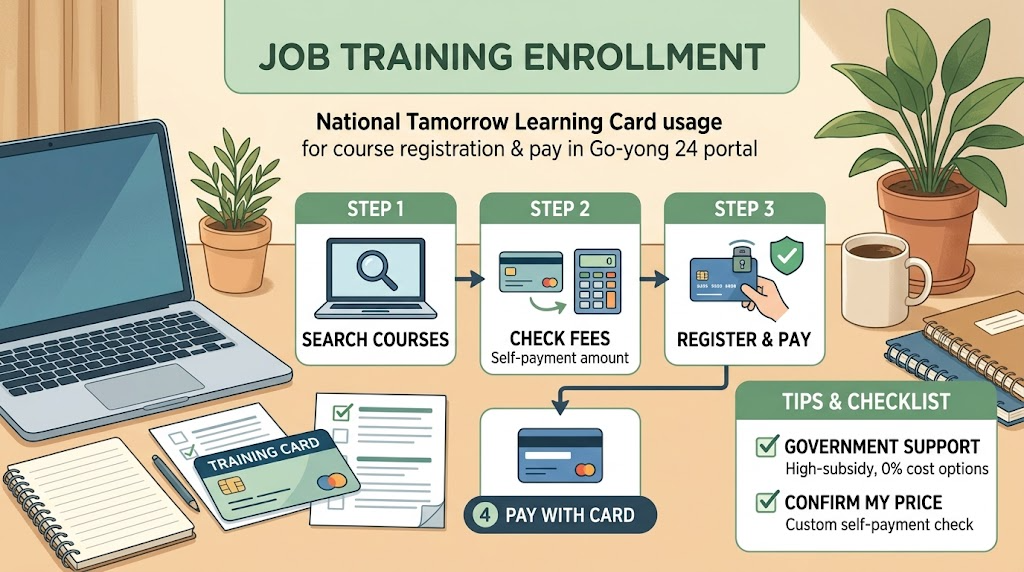
Know-How for Searching and Comparing Desired Training Courses on the Work24 Portal
Once you have completed the issuance of the Tomorrow Learning Card, the next gateway is selecting the lecture that fits you best among countless training courses. Thousands of online and offline training courses are registered on Work24, so blindly searching keywords alone makes it easy to pick promotional courses or lectures that do not match your level. Here is a summary of essential filtering and comparison tips to ensure satisfactory completion and employment linkage.
- Narrowing Search Scope Through 3-Step Tailored Filtering
Actively utilizing the filter function on the ‘Vocational Competency Development → Search and Apply for Training Courses’ page from the Work24 main menu can reduce unnecessary search time.
- Setting Region and Commute Distance: Since offline courses require commuting 3–5 times a week, limit to areas within 1 hour by public transportation based on your residence (city/county/district level).
- Selecting Training Type:
- Select ‘K-Digital Training (KDT)’ or ‘National Core and Strategic Industry Training’ if you want full funding and hands-on projects
- Select ‘General Training Course’ if your goal is job duty supplementation or short-term certificate acquisition
- Matching Start Dates: Considering document screening and pre-consultation periods (typically 1–2 weeks), it is safe to choose courses starting at least 2 weeks after the search date.
- 3 Key Indicators for Identifying Excellent Training Institutions
Even with the same certification and identical curriculum, employment outcomes after completion vary drastically depending on the educational institution’s capability. Be sure to check the following 3 factors on the course details page.
| Inspection Indicator | Check Location | Criteria and Tips |
|---|---|---|
| Accreditation Evaluation Grade | Mark next to training institution name | Prioritize institutions with the 3-year or 5-year certified excellent training institution mark certified by the Ministry of Employment and Labor |
| Completion Rate and Employment Rate | Course details ‘Institution Information’ | Select courses with a completion rate of 85% or higher and an employment rate higher than the average for the same occupation |
| Actual Course Reviews (Satisfaction) | ‘Course Reviews’ tab | Check not only the star rating score, but also reviews regarding the instructor’s responsiveness in Q&A and the condition of hands-on practice equipment |
💡 Course Review Check Tip
Course reviews on Work24 are public data that only students who met the actual attendance rate and completed the course can write. If there are repeated criticisms such as “the instructor changed frequently mid-course” or “textbooks and practice environments were poor,” it is best to avoid them.
- Selection Criteria: Online (Remote) vs. Offline (On-Site) Courses
To prevent dropping out mid-course, you must clearly decide on the lecture format tailored to your daily schedule and learning goals.
- Online (Remote) Training:
- Suitable Candidates: Current workers, individuals balancing childcare, candidates preparing short-term for theory-centered certificates (computerized accounting, Computer Specialist, etc.)
- Pros and Cons: Free from time and space constraints, but high risk of receiving non-completion penalties if you cannot manage your own progress rate
- Offline Group Training:
- Suitable Candidates: Non-major job seekers, occupations where portfolio work is essential, such as programming, video editing, and design
- Pros and Cons: Fast instructor feedback and smooth team project operations, but high burden of maintaining attendance rates (80% or higher)
Here are tasks you can proceed with next:


Hands-on! Work24 Online Course Application and Training Institution Registration Procedures
Once you have found your desired course, you must now proceed with the actual course application and institution registration. Because the application path and procedure divide completely depending on the training hours, checking the total training hours of your chosen lecture first is key.
- The 140-Hour Benchmark: Immediate Online Application vs. Employment Center Diagnosis and Consultation
Before clicking the course application button on Work24, the approach differs based on the total training hours (140 hours) of the course.
- Short-Term Courses Under 140 Hours (Immediate online application available):
- Relatively lighter courses belong here, such as Computer Specialist, Photoshop basics, and short-term certificate practical tests.
- Without separate consultation at an employment center, you can add your desired course to the cart on the Work24 portal and complete the online course application right away.
- Long-Term Courses of 140 Hours or More (Diagnosis and consultation mandatory):
- Full-time employment-linked courses such as K-Digital Training (KDT), Computerized Tax Accounting packages, Web Publisher, and National Core Strategic Industry Training fall under this category.
- You must complete ‘Training Diagnosis and Consultation (writing an online training plan)’ on Work24 as a requirement, and course enrollment eligibility is granted only after final approval is received from the officer in charge at your local Employment Welfare Plus Center.
- Step-by-Step Guide for Work24 Online Course Application
- Access the Course Details Page: After logging into Work24, click the ‘Apply for Course’ button of your selected course.
- Verify Support Type and Reduction Qualifications: Select your current status, such as general job seeker, employed worker, or participant in the National Employment Support Program (Type 1/Type 2), to reflect any copayment reduction in the system.
- Complete Training Plan and Preliminary Survey:
- Briefly describe the relevance to your desired employment field, purpose of course enrollment, post-completion employment plans, etc.
- Because insincere responses may trigger requests for supplementation during the Employment Center approval stage, detail your specific job-seeking determination.
- Check Receipt Confirmation After Application: Verify on My Page whether the application status has changed to ‘Application Completed (Under Review).’
- Preliminary Interview with Training Institution and Final Registration Completion
Completing the online registration on Work24 does not mean the entire process is finished. Because government-subsidized courses have limited capacity per training institution (academy), each institution conducts its own selection procedures.
| Step | Main Content | Preparations |
|---|---|---|
| Step 1: Receive Contact from Institution | Receive telephone contact from an academy counselor within 1 to 3 days after Work24 application | Confirm schedule and coordinate level test/interview dates |
| Step 2: Preliminary Consultation & Interview | Review basic learning ability, commitment to complete attendance, and employment preparation status | Resume or portfolio (for development/design courses) |
| Step 3: Final Selection Notification | Notification of successful candidates within capacity and delivery of course opening instructions | Check required documents to bring on the opening day and photo ID guidance |
💡 Precautions
For popular courses, even if approved on Work24, you may be pushed back to the next session if the academy reaches maximum capacity. Once you find a preferred course, calling the training institution directly right after applying on Work24 to confirm provisional registration is the safest approach.
Here are tasks you can proceed with next:

Copayment Payment and Attendance Management: How to Complete the Course Without Penalties
Utilizing the Tomorrow Learning Card, etc.This is a practical guide to meeting the copayment refund requirements and completing courses without penalties in the Tomorrow Learning Card or government-subsidized training curriculums.
Principles of Copayment Payment and Refund
Payment with Tomorrow Learning Card Under Your Own Name: After course enrollment approval, registration is completed only when you pay directly using the Tomorrow Learning Card (credit/debit) issued under your own name within the designated payment deadline.
Refund Conditions by Type: For those eligible for copayment refunds, such as participants in the Employment Success Package or Type 1 of the National Employment Support Program, a full or partial refund will proceed only after satisfying the condition of attending 80% or more of the prescribed working/training days and maintaining employment for a certain period after course completion.
Penalties for Failing Completion Standards: If you drop out mid-course without meeting the completion standard (80% attendance), copayment refunds become impossible, and penalties such as deductions from the account support limit (e.g., 200,000 KRW deducted for a 1st mid-course abandonment) and restrictions on course enrollment will occur.
Attendance Recognition Standards and Conversion Rules for Tardiness/Early Departure
Basic Completion Requirement: You must attend at least 80% or more of the total prescribed attendance days to be recognized for regular completion.
Formula for Cumulative Tardiness, Early Departure, and Going Out:
1 Day of Absence = (Tardiness + Early Departure + Going Out) Combined 3 Times
Standard for Daily Absence Processing: When attending less than 50% of the daily training hours (e.g., 8 hours), that day is immediately processed as 1 day of absence, regardless of the number of tardiness or early departure occurrences.
Check-in and Check-out Principle: Both check-in and check-out must be recorded using the Ministry of Employment and Labor HRD-Net app (beacon/QR) or the physical card. If either one is omitted, it will be treated as an absence, so an explanation must be submitted immediately to the training institution’s administrative office on the same day.
Excused Absences (Official Absence) and Tips for Preventing Penalties
Submission of Supporting Documents: When unavoidable reasons occur, such as reserve forces training, family events of oneself or direct family members, illness, or hospitalization, attendance recognition (official absence) can be granted within the prescribed limit of days upon submitting relevant certificates (notices, medical certificates, etc.).
Unit Period Management: Because the payment of training allowances (training incentives) is calculated based on an attendance rate of 80% or higher per 1-month unit period rather than the entire duration, you must manage attendance days by calculating backward based on the end date of each monthly unit period to avoid allowance reductions.
Regular HRD-Net Monitoring: It is safe to directly compare and check your attendance status on HRD-Net My Page at least once a week to ensure there are no omissions due to training institution attendance terminal errors.
Would you like me to calculate the permitted absence days if you let me know the total training hours and days of the course you are currently taking or planning to take?
Yes
Korean version: 한국어로 읽기