Introduction: After Getting Your Tomorrow Learning Card, What Is the Next Step?
You’ve finished applying for the National Tomorrow Learning Card, and you hold the card delivered by mail or received from the bank in your hands—that sense of accomplishment! Everyone can relate to this. You made the big decision to get the card to learn new skills, change careers, or enhance your job competencies, but once you put the card on your desk, these thoughts naturally come to mind.
“I’ve got the card in my hand… Now where and how should I even start?”
“Do I just visit the academy and pay directly? Or should I apply online first?”
Getting the card doesn’t mean it’s over. Rather, from now on is the actual starting point to 100% utilize genuine government-supported benefits. If you don’t properly understand the course registration and payment process, a wrong procedure could cause you to miss out on your desired course or end up paying more out-of-pocket costs than necessary.
🎯 What You Will Definitely Learn Through This Article
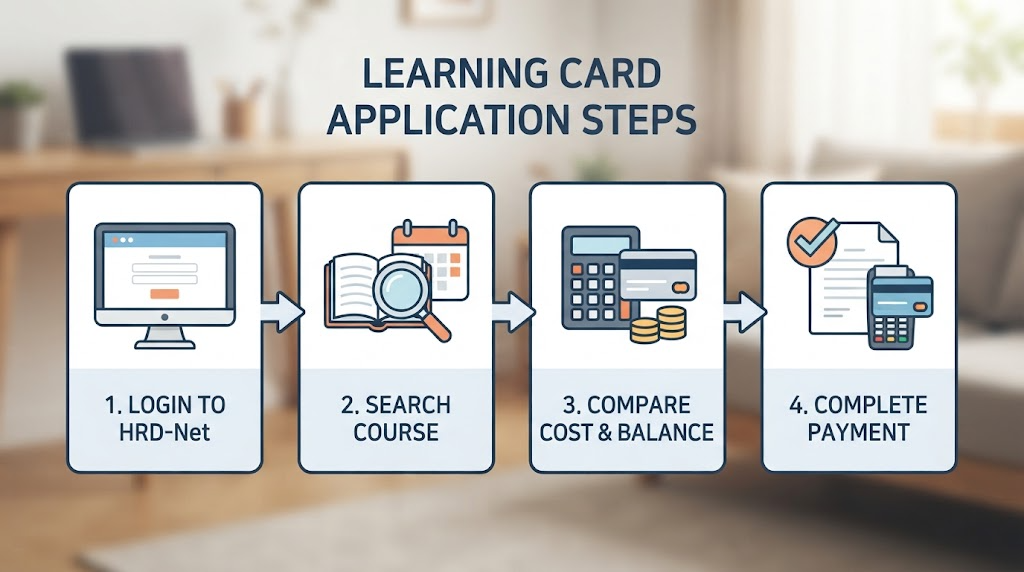
We have neatly organized the entire flow from course registration to payment, which recipients of the National Tomorrow Learning Card are most curious about, into 4 easy-to-understand steps.
- Exploring Training Courses: How to find a government-supported academy that fits you perfectly on Employment24 (HRD-Net)
- Online Course Registration: A procedure to easily apply from home without wasting a trip
- Waiting for Review and Approval: Why you must wait until the employment center approval comes through
- Final Payment Completion: Neatly paying out-of-pocket costs with the National Tomorrow Learning Card
From now on, we will go through smart course registration and payment guides step by step so that you can utilize your card by 200% and start your desired education without a hitch. If you follow along to the end, anyone can complete registration perfectly without getting lost!
If you need the content for ‘[Step 1: Exploring Training Courses] Finding a Course That Fits You on HRD-Net’ that follows next, please feel free to tell us!

[Step 1: Exploring Training Courses] Finding a Course That Fits You on HRD-Net
If you have been issued a Tomorrow Learning Card, the very first thing you need to do is explore and choose a ‘training course’ to decide where to use the subsidy loaded on your card.
In the past, you had to visit an employment center in person or flip through paper booklets, but now you can compare government-supported academies and courses nationwide in real time with just a PC or smartphone.
💻 Step 1 Practical Exploration Method: Accessing ‘Employment24 (HRD-Net)’
All searches and applications related to the National Tomorrow Learning Card are processed through the official vocational training portal ‘Employment24 (formerly HRD-Net)’.
- Utilizing PC or Mobile App: Search for ‘Employment24’ or ‘HRD-Net’ on a search portal to access the official website, or download the official Employment24 app on your smartphone.
- Logging In: Log in through simple authentication (Naver, Kakao, etc.) or a joint certificate. (It must be your own account linked with the card so that training information can be queried correctly.)
🔍 Step 2: Smartly Searching for Courses That Fit You
Rather than blindly typing the name of an academy you want to go to in the search bar, you should actively utilize the filter functions below to reduce the probability of failure.
Setting Region and Schedule: First set the region (city/county/district) to see if you can commute near your residence (or workplace), and select your desired opening date or weekday/weekend class options.
Keyword Searching: Enter specific job keywords you want to learn, such as ‘Computer Literacy’, ‘Computerized Tax Accounting’, ‘Web Design’, or ‘Barista’.
Selecting Training Type: Narrow down courses matching your type, whether it is a National Key/Strategic Industry Occupation or a general National Tomorrow Learning Card general course.
💰 The Most Important Point: Checking ‘Out-of-Pocket Cost’ and ‘Training Fee’
When you click on the course detail page, not only the training period and hours but also the most important cost information is transparently disclosed.
Total Training Fee: The total cost required to take this course.
Government Subsidy: The amount supported by the government through the Tomorrow Learning Card.
Out-of-Pocket Cost: The amount you must directly pay by card, excluding the government subsidy. (※ Since the out-of-pocket ratio is applied differently depending on individual employment types such as workers, job seekers, and earned income tax credit recipients, you must check your own burden amount!)
Training Allowance Payment Status: Information on allowances that can be received into your bank account every month if you meet a certain attendance rate (e.g., 80% or more, such as maximum monthly amount) is written, so be sure to check this part thoroughly as well.
💡 Core Summary Checklist
[ ] Did you access the official Employment24 (HRD-Net) website or app and log in?
[ ] Did you search for training courses and academies matching your residence and schedule?
[ ] Did you compare the out-of-pocket cost of the course with your card balance?
[ ] Did you check if the course is eligible for training allowance payment?
Did you find a training course you love? If so, it is now time to move on to the second gateway: the online course registration stage. We will point out how to apply easily in the next subheading!
[Step 2: Course Registration] Applying Easily Online
Did you find a training course you love on Employment24 (HRD-Net)? If so, before blindly calling or visiting the academy, the proper procedure is to proceed with course registration easily online first.
By applying online first, you are registered as an official trainee, which allows subsequent steps like employment center approval and card payment to proceed smoothly like flowing water. We have summarized the online course registration method that you can follow easily and quickly.
🖱️ Step 1: Pressing the ‘Course Registration’ Button on the Course Detail Page
- Go to the detail page of the desired training course searched on Employment24 (HRD-Net).
- Boldly click the [Course Registration] button located at the bottom or right side of the page. (※ If you are not logged in at this time, the simple authentication login window will pop up first.)
📝 Step 2: Entering Trainee Information and Checking Advance Guidance
When you press the course registration button, the screen transitions to the application form writing screen.
Checking basic information: Check whether contact information, address, and current employment status (unemployed, employed, etc.) are entered correctly.
Checking advance requirements: For some specialized courses, Worknet job seeker registration must be completed as a mandatory requirement, or the National Tomorrow Learning Card issuance status must be normal to apply. If the conditions are not met, a guide window will pop up, so please take care of it first before proceeding.
Selecting support type: Select the support target type applicable to you and briefly write down the application reason, etc.
⚠️ Step 3: Important Precautions When Registering for Courses
Beware of capacity deadlines: Popular government-supported courses (e.g., developer courses, tax accounting, barista, etc.) often reach capacity early. If you want to take a course, it is safe to apply in advance with plenty of time according to the opening date schedule.
Restriction on simultaneous applications: As a rule, you cannot duplicate course registration for multiple training courses at the same time with the National Tomorrow Learning Card. Carefully compare schedules in advance to see if schedules overlap.
💡 Core Summary Checklist
[ ] Did you press the [Course Registration] button on the detail page of the desired course on Employment24?
[ ] Was personal information such as contact information and employment type entered accurately?
[ ] Did you complete all mandatory advance requirements such as Worknet job seeker registration?
Once you have completed online course registration, you will now go through the stage where the academy and jurisdictional employment center review and approve the application details. In the next subheading, we will look into the ‘Waiting for Review and Approval’ process in detail!

[Step 3: Qualifications and Waiting for Review] Checking Approval Results and Precautions
Once you have safely completed course registration online, you might think you can go straight to the academy, but one more step of the procedure remains. That is the stage of ‘Waiting for Review and Approval from the Jurisdictional Employment Center (or Training Institution).’
For those who are feeling anxious wondering, “I applied, but why isn’t it confirmed right away?”, we point out what you need to check and what you should watch out for during the review period.
⏳ Step 1: Approval Review Process and Required Period
Once online course registration is completed, the relevant training institution and jurisdictional employment center review the applicant’s eligibility conditions (card balance, employment type, prerequisite course completion status, etc.).
Required period: It is usually processed within about 1 to 3 business days, but it may be delayed slightly on weekends or seasons when trainees flock in.
Result check method: You must frequently check whether the current status in ‘Course Registration History’ on the Employment24 (HRD-Net) My Page has changed from [Course Waiting] to [Course Approved]. (Occasionally, if supplementary documents are needed, the employment center or academy will contact you, so please answer the phone even if it is an unknown number!)
⚠️ Step 2: Things You Must Watch Out For When Waiting for Approval and Checking Results
- Pre-consultation and Trainee Selection Process: For some specialized technical courses (e.g., national key and strategic industry occupations, etc.), final selection is sometimes confirmed not just through online application alone, but through an academy’s own interview or job performance evaluation (consultation). In this case, you must surely respond to the academy’s guidance in addition to the employment center’s approval.
- Checking Training Fee Support Eligibility: If your Tomorrow Learning Card limit is insufficient, or if the remaining limit is exceeded because you are already taking another government-supported course, it may be rejected during the review process. Be sure to check your own balance before applying.
- Restrictions on Cancellation and Modification: Since the procedure can become complicated if you cancel a course due to personal reasons after approval is completed, it is best to re-verify your schedule one final time during the approval waiting period to ensure that schedules do not overlap.
💡 Core Checklist
[ ] Did you check whether the course registration status changed to [Course Approved] on the Employment24 My Page?
[ ] Did you receive guide text messages or confirmation calls from the academy or employment center without missing them?
[ ] Did you check whether the course requires a separate interview or pre-consultation?
If you have finally received [Course Approved] from the employment center and training institution, it is now time to move on to the ‘Final Payment and Out-of-Pocket Cost Payment’ stage, which will decorate the grand finale of government-supported learning. We will guide you in detail in the next subheading!

[Step 4: Payment and Out-of-Pocket Cost Payment] Making Final Payment with the National Tomorrow Learning Card
Did you finally receive the [Course Approved] notification from the jurisdictional employment center and training institution? Congratulations! Now only the most crucial final gateway to start government-supported training remains: the ‘Final Payment and Out-of-Pocket Cost Payment’ stage.
We have easily organized the payment methods and precautions that are easy to get confused about at this decisive moment when academy registration is completed.
💳 Step 1: Checking Government Subsidy Deduction and ‘Out-of-Pocket Cost’
When paying tuition fees with the National Tomorrow Learning Card, the total amount is not paid all at once or completely wiped out from your card limit.
Automatic deduction of government subsidy: The portion supported by the state out of the total tuition fee (amount according to the government subsidy rate) is automatically deducted, and you only pay the ‘out-of-pocket cost (self-pay amount)’ that you must bear yourself.
Checking the self-pay amount: Since the out-of-pocket ratio is applied differently from 0% up to several tens of percent depending on individual employment types (general job seekers, workers, National Employment Support System participants, earned income tax credit recipients, etc.), you must check the accurate out-of-pocket amount in advance through the Employment24 screen or the academy.
🏢 Step 2: Payment Progress Method (Visit vs. Online Payment)
Depending on the training course and academy system, there are slight differences in payment methods.
Academy visit payment: This is the most certain and common method. Visit the academy in person before the opening date and pay the out-of-pocket tuition fee through a payment terminal using the issued National Tomorrow Learning Card (credit or check card).
Online payment: If the My Page within the Employment24 (HRD-Net) site or the online payment system of the training institution is linked, you can also easily pay out-of-pocket costs by card at home via PC or mobile.
⚠️ Step 3: Precautions That Must Be Kept When Paying
- Must pay only with the ‘Tomorrow Learning Card’: When paying the out-of-pocket cost, you cannot receive government support benefits if you pay with another credit card or cash under your own name. You must receive approval with your issued National Tomorrow Learning Card (card connected to the designated account) to be registered as an official student.
- Compliance with Payment Deadlines: If you do not complete the payment within the payment deadline guided by the academy or employment center (usually a few days before the opening date or on the opening date itself), the course approval you received with difficulty may be canceled or automatically dropped, so you must strictly observe the schedule.
- Checking Card Balance and Limit: Please check your bank account balance in advance to see if the out-of-pocket amount exceeds the balance of the card payment account (in case of a check card) or the card usage limit (in case of a credit card).
💡 Core Summary Checklist
[ ] Did you check the exact out-of-pocket amount you need to pay out of the total tuition fee?
[ ] Did you prepare the payment method with the National Tomorrow Learning Card instead of a regular card?
[ ] Did you complete the payment within the payment deadline guided by the academy?
If you have safely completed up to the payment, trainee registration is finally complete! In the following subheading, we will look into attendance management and training allowance benefits that you must know before classes officially start!

Essential Check Before Class Starts: Attendance Management and Allowance Guide
Have you finally finished the payment and completed official student registration with your Tomorrow Learning Card? Now you can just count down the days until the first class.
Before classes officially begin, there are ‘2 things in the government-supported training process that are most important and must never be missed.’ They are thorough attendance management and the training allowance guide to reap your benefits. You need to know this information in advance so you won’t suffer disadvantages later, right? We have organized it easily to understand.
🕒 Step 1: ‘Electronic Attendance System’ Where You Must Not Miss a Single Minute or Second
Since government-supported courses are education operated with national budgets, attendance management is conducted much more strictly than general private academies.
Attendance check method: Before the start and at the end of class, tag your card on the terminal installed at the academy or perform a QR code attendance check using the Employment24 (HRD-Net) mobile app. (Or fingerprint recognition systems are sometimes used.)
Risks of being late, leaving early, and going out:
If tardiness, leaving early, and going out accumulate more than a certain number of times, it is processed as ‘absence.’
You can receive a certificate of completion only if you attend 80% or more of the total training days, and if you fail to meet 80%, you will be processed for mid-course dropout (expulsion) and may receive disadvantages in future card use, so punctuality is life!
💰 Step 2: Grab ‘Training Allowances’ and Support Subsidies That Are Too Wasteful to Miss
For students who diligently participate in classes, the government supports training allowances under the name of transportation or meal expenses.
Payment targets and conditions: Among training courses participated in with the National Tomorrow Learning Card, allowances are deposited into bank accounts every month for students who meet the requirements and have an attendance rate of 80% or more. (※ There are differences in support amounts and targets depending on training types or participation in the National Employment Support System.)
Importance of attendance management: After all, since training allowances are also calculated based on thorough electronic attendance, attending classes faithfully without missing them is the way to protect your own allowance!
💡 Core Summary Checklist
[ ] Did you install the Employment24 (HRD-Net) app on your smartphone and check the mobile attendance check method?
[ ] Are you determined to maintain an attendance rate of 80% or more without being late or absent?
[ ] Did you check in advance whether your course is eligible for training allowance payment?
Once you have perfectly mastered attendance management and allowance criteria, all preparations to successfully complete your government-supported learning are finished. Finally, only the concluding remarks that neatly summarize the entire content remain. We will wrap it up in the next subheading!
Conclusion: Summary for Successful Government-Supported Learning
So far, we have meticulously looked through exploring training courses via Employment24 (HRD-Net) after receiving the National Tomorrow Learning Card, going through online course registration and review approval, up to the final card payment and attendance management.
When you first received your card, the procedures might have felt complicated and unfamiliar, but as you followed along step by step, wasn’t it easier than you thought?
📝 Summary of 3 Core Commandments for Successful Government-Supported Learning
- Meticulously explore courses that fit you: Check and select your residence, schedule, and most importantly, out-of-pocket costs and training allowance conditions in advance through Employment24.
- Strictly observe online applications and payment deadlines: Wait for employment center approval after course registration, and make sure to accurately pay with your Tomorrow Learning Card within the guided payment deadline to complete official registration.
- Complete the course through thorough attendance management: Make electronic attendance (QR code/tagging) a daily habit to achieve an attendance rate of 80% or higher, and securely take home your completion certificate and training allowances!
The National Tomorrow Learning Card is a precious national asset that reliably supports your new challenges and career growth. We sincerely cheer you on to successfully achieve your target certification acquisition and job competency enhancement with thorough advance preparation and a diligent attitude toward learning!
We hope this article was of great help to your wise government-supported learning, and if you have any questions during the course, please feel free to leave a comment or inquiry anytime. Thank you!
Korean version: 한국어로 읽기