
What Should You Check First When You Receive the Regular Application Notice for the Earned Income Tax Credit? 📋
If you have received a regular application notice for the Earned Income Tax Credit through postal mail or a mobile notice (KakaoTalk, text message), you will likely feel happy while simultaneously wondering, “What and how should I do this now?” Receiving the notice does not mean the application is automatically completed; you must personally go through the application procedure to receive the tax credit.
For a successful and quick application, we will point out the 4 core checkpoints you must check first when you open the notice.
- Individual Authentication Number (Essential number other than registration numbers) 🔑
What to Check: An ‘individual authentication number’ consisting of 8 digits is written at the top or in the body of the notice.
Reason: When proceeding with a simple application via ARS telephone application or the Hometax/Sontax app, entering this individual authentication number instead of a long registration number allows you to drastically omit complex authentication procedures and instantly enter the login and application stages. Be sure to note down this number so you do not throw away or lose the notice.
- Application Period and Deadline 📅
What to Check: You must check the regular application period (typically May 1 to May 31) and the exact application deadline stated on the notice.
Reason: If you fail to apply within the deadline and it moves to a post-deadline application, 10% of the calculated tax credit amount will be deducted and paid, resulting in financial loss. Processing it right on the day you receive the notice is the safest option.
- Expected Maximum Payment Amount Notified 💰
What to Check: Check how much the ‘expected payment amount’ calculated in advance by the National Tax Service is.
Reason: This amount is determined based on household member composition (single-person, total income-based dual-income, etc.), total salary, etc., and may fluctuate slightly depending on the National Tax Service screening results when actually deposited into your account. It serves as an indicator to roughly grasp the scale of what you will receive in advance.
- Account Number Under Your Name to Receive the Refund and Contact Information 📱
What to Check: Check whether the account number registered in the notice is correct, or whether it is ‘an account under the name of the application notice target person’.
Reason: You cannot receive the tax credit with an account under someone else’s name, and if an account error occurs, payment may be significantly delayed. If you check whether your own account is registered in advance from the notice, you can proceed smoothly through the application process.
If you have thoroughly grasped the above 4 pieces of information through the notice, it is now time to finish the application quickly and easily in earnest. In the next chapter, we will guide you in detail through 3 simple application methods that can be completed in 1 minute via mobile, ARS, and PC!
3 Fastest ‘Simple Application’ Methods When You Receive a Notice 💡
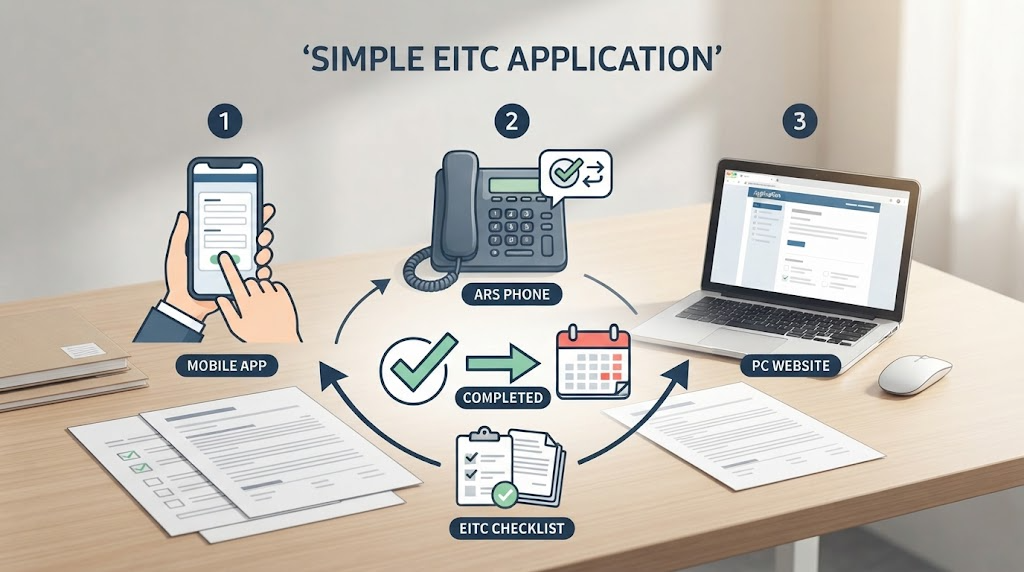
If you have received a regular application notice for the Earned Income Tax Credit from the National Tax Service, you can use the ‘Simple Application Service’, which allows you to apply very easily and quickly without complex document submission or membership registration procedures. We introduce 3 representative methods that can be completed in 1 to 2 minutes as long as you have the individual authentication number checked beforehand. Choose the method most convenient for you!
- Method to apply in 1 minute via mobile (Sontax App) 📱
This is the most popular method recommended for those who are most familiar with smartphones.
Step 1: Launch the ‘Sontax’ app on your smartphone. (If you don’t have the app, download it for free from the Google Play Store or Apple App Store)
Step 2: Touch the ‘Apply/Submit’ menu on the main screen, then select ‘Earned/Child Tax Credit Simple Application’.
Step 3: Log in by entering the last 7 digits of your registration number and your individual authentication number (8 digits) checked from the notice earlier.
Step 4: Lightly check the loaded application details (contact information, refund account, etc.) and press the ‘Apply’ button to finish.
- Method to apply easily via ARS (Telephone) ☎️
If installing a smartphone app is cumbersome or complex screen operation is difficult, you can resolve it with a single phone call.
Step 1: Call the dedicated number 1544-9944.
Step 2: Press 1 (Earned/Child Tax Credit Application) according to the voice guidance.
Step 3: Enter the 13 digits of your registration number and the individual authentication number (8 digits) written on the notice via voice or keypad.
Step 4: Check and enter the refund account number and contact information under your own name to receive the tax credit, and the application is finally completed. (ARS is available 24 hours a day.)
- Application Method via Hometax (PC Website) 💻
This is a method for those who want to process it on a PC while checking meticulously on a big screen.
Step 1: Access the National Tax Service Hometax official website (hometax.go.kr) and log in. (Login is available via joint certificates, simple authentication, etc.)
Step 2: Click ‘National Proofs·Business Registration·Application/Submission’ in the upper menu bar, then select ‘Apply for Earned/Child Tax Credit’.
Step 3: Click the ‘Simple Application’ tab, enter the individual authentication number received in the notice, and load the recipient information.
Step 4: Finalize checking contact information and account information to receive the refund, then press ‘Apply’ for normal submission.
💡 Tip: Simple application is a privilege given only to targets to whom the National Tax Service has sent a notice (holders of individual authentication numbers). If you received a notice, choose the method most familiar to your hands among these three methods and hurry to complete it before the deadline!
In the next chapter, we will point out essential information and precautions that must definitely be checked after completing the application.

Essential Information and Precautions That Must Be Checked When Applying ⚠️
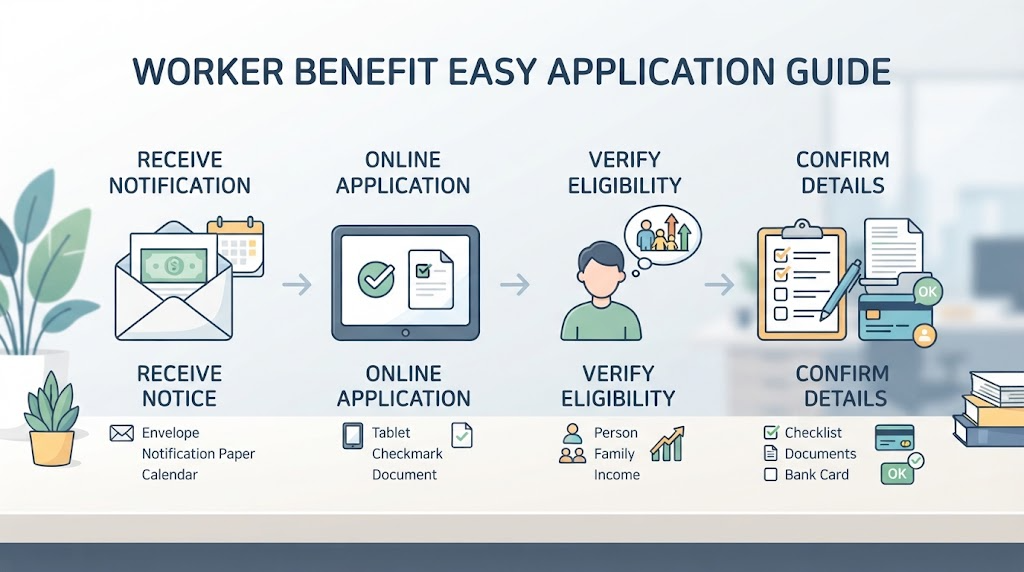
Just because you finished the earned income tax credit simple application easily and quickly does not mean you can rest easy yet. To ensure there are no omissions or disadvantages during the tax credit screening process, we point out 4 essential pieces of information and precautions that must be checked immediately after application and during the screening period.
- Whether a Correct Refund Account Under Your Own Name is Registered 💳
Precaution: The tax credit is paid exclusively to an account under the applicant’s own name. If you enter an account under someone else’s name or a seized account, payment may not proceed normally or major delays may occur.
Solution: When entering the account number, please double-check meticulously before final submission to ensure there are no typos in the bank name and account number digits. If you wish to receive it in cash, you can also receive it directly at the post office by obtaining a ‘National Tax Refund Notice’ according to National Tax Service guidance.
- Immediate Renewal When Contact Information (Cell Phone Number) Changes 📞
Precaution: Important notifications such as screening progress, requests for additional document submission, and final payment notices are all transmitted to the cell phone number (KakaoTalk or text message) entered at the time of application.
Solution: If your contact information has changed after application or you suspect a typo in the number, you must update your personal information (contact information) to the latest status on the Hometax/Sontax My Page so as not to miss important guidance.
- Final Check on Fulfillment of Income and Property Requirements 🔍
Precaution: Even if you received a notice and completed the application, if it is confirmed during the National Tax Service’s main screening process that the total income criteria or property sum (less than 200 million KRW, etc.) of all household members exceeds statutory criteria, you may be excluded from payment targets or reduced.
Solution: Since the notice strongly carries the character of ‘preliminary guidance’ dispatched based on the previous year’s national tax data, it is safe to re-verify yourself whether you comply with the current criteria.
- Checking Screening Result Notification and Objection Period ⏳
Precaution: Regular application results are usually announced sequentially within 3 months from the application deadline (around late August to mid-September).
Solution: If you have questions about the screening result or a smaller amount than expected is paid, you can proceed with an appeal (objection) via Hometax within the specified deadline from the date of receiving the notice, so you must definitely check the detailed breakdown after receiving the result.
⚠️ Core Summary: Simple application ends with a few mouse clicks, but accurate account entry and contact maintenance are entirely your responsibility. Please definitely remember the above items so that trivial mistakes do not lead to payment delays or omissions!
In the next chapter, we will cleanly organize the entire process through the final wrap-up and FAQ resolution (payment schedule guidance).

Conclusion and FAQ Resolution (Payment Schedule Guidance) 🌟
So far, we have carefully examined what to check first when receiving an earned income tax credit regular application notice, what the simple application method to finish in 1 minute via Sontax, ARS, or Hometax is, and the precautions that must definitely be handled after application.
If you received a notice, do not think about it complicatedly, and try to quickly and simply finish the application within the deadline utilizing the individual authentication number you possess!
Lastly, we will organize the regular application payment schedules and frequently asked questions that you are most curious about.
- 2026 Earned Income Tax Credit Regular Application Payout Schedule 📅
Screening and payout timing: The screening for those who completed their regular application in May is meticulously conducted by the National Tax Service for 3 months, and final payouts are sequentially made usually between late August and mid-September.
Payout method: Once the screening is completed, the tax credit is deposited in a lump sum into the refund account under your own name registered at the time of application. (If you received a National Tax Refund Notice, cash can be received at the post office)
- Frequently Asked Questions (FAQ) 💬
Q. I haven’t received a notice, can I check if I am a target?
Yes, it is possible. After logging in to the Hometax or Sontax app, if you go to the [Tax Credit·Refund·Certificates] > [Earned/Child Tax Credit Regular Application] menu, you can directly inquire whether you are a target and your expected payout amount and apply even if you did not receive a notice.
Q. What happens if I miss the deadline (May 31)?
Even if you miss the May regular application period, ‘post-deadline application’ is available from June 1 to November 30. However, since 10% of the calculated tax credit amount is reduced and paid due to the expiration of the statutory deadline, it is most advantageous to complete it within the regular application period if possible.
✨ Warm Closing Remarks: The earned income tax credit that serves as a reliable pillar of support for hard-working youth and workers! If you have checked the notice, finish your simple application right today and enjoy the pleasant joy of a refund in the upcoming autumn. If you have any further questions, please feel free to leave a comment or inquiry anytime!
Korean version: 한국어로 읽기