Introduction: Checking Health Check-up Results, As Important as the Check-up Itself—How Should We Receive Them?
If you have carved out a busy schedule, fasted from the previous day, and successfully completed your health check-up amidst a bit of tension, it is time to let out a sigh of relief. However, many people drop their guard the moment they step out of the examination center, thinking, “The hard part is over, time for happiness.”
In fact, figuring out how to check and analyze your results is just as important as getting the check-up itself. Drawing blood and taking X-rays are merely steps for collecting data; the true core lies in accurately reading the report containing your body’s condition and taking appropriate follow-up actions.
Even when you make up your mind to thoroughly check your results, quite a few people find themselves frustrated because they don’t know when or through which channel the report will arrive, or they miss their mailbox and discover old results much later.
In this article, starting from filling out the questionnaire after completing a health check-up, we will clearly examine how to easily and quickly query your health check-up results through various channels such as mail, mobile, and online.
- Why the Completion of a Check-up Lies in ‘Checking the Results’
Tracking changes in your body: Comparing your check-up results annually or periodically allows you to grasp minor increases in numerical values or trends in health indicator changes at a glance, serving as a powerful shield to block diseases in advance.
The danger of lowering your guard: If you delay checking your results, thinking, “There probably won’t be any special notice” or “I feel fine so it’s okay,” you might miss minor abnormal findings or pre-cancerous signs where early intervention is possible, causing you to lose the golden time.
- Flow to Keep in Mind in Advance for Result Inquiries
After completing a check-up, it usually takes about 2 to 4 weeks of analysis period for the results to reach your hands.
This is because it goes through meticulous verification stages such as blood analysis, image reading, and drafting a specialist’s comprehensive opinion.
During this period, you could wait to receive them via traditional mail, but recently, checking results in real-time as quickly as possible through mobile apps or the internet has become the mainstream trend.
Then, how does the overall process flow from filling out the questionnaire to generating the health check-up results, and through which method can you receive your results most conveniently? In the following content, we will guide you step by step through specific query methods.

Guide to the Overall Process from Questionnaire Completion to Result Notification
From booking a health check-up, visiting the hospital, finishing the tests, to finally holding the final report in your hands, a set of predetermined administrative and medical procedures exists. Grasping the overall flow in advance helps you proceed smoothly without panicking on the day of the check-up and is worth utilizing well to gauge when the results will come out.
Let’s clearly break down the entire process from the questionnaire filling stage to the final result notification into 4 steps.
Step 1: Check-up Booking and Pre-Questionnaire Completion (The Very First Button)
The beginning of a health check-up is booking the hospital, but the start of actual health data collection is ‘filling out the questionnaire’.
Role of the questionnaire: It is a survey asking about regular smoking and drinking habits, amount of exercise, past medical history, family history, and current subjective symptoms you feel. This questionnaire is not just a document; it acts as a core compass that helps the doctor grasp your body’s condition and direct which precise examinations need intensive reading.
Filling method: Nowadays, people sometimes visit the hospital to fill out a paper questionnaire, but you can drastically reduce waiting time by filling out an electronic questionnaire in advance before visiting through the National Health Insurance Service Health In website or mobile app.
Step 2: Conducting Examinations on the Day of Check-up (Reflecting Questionnaire Contents)
You visit the hospital on the scheduled date to proceed with the full check-up.
Based on the completed questionnaire and examinee inquiry results, basic examinations such as physical measurements (height, weight, body mass index, blood pressure, vision/hearing), blood tests, urine tests, and chest X-rays are conducted, along with your chosen package or age-specific cancer screenings (gastric endoscopy, cervical cancer screening, etc.).
If there are special notes or family history written on the questionnaire, the medical staff pays closer attention when conducting tests or image readings for those specific areas.
Step 3: Data Analysis and Specialist Reading (Duration Required: Approx. 2 Weeks to 4 Weeks)
Just because all examinations are finished does not mean results come out immediately.
Collected blood and tissues go through precise analysis processes at the testing center, and image materials such as X-rays, ultrasounds, and endoscopies go through meticulous readings by radiologists.
It usually takes about 2 to 3 weeks (up to 4 weeks depending on institutional circumstances) to compile all this data and draft comprehensive opinions. During this period, the examinee waits for the results.
Step 4: Final Result Notification and Follow-up Management
Once reading is completed, the check-up institution delivers the report to the examinee.
Delivery method: In the past, bulk delivery by mail was dominant, but recently, you can check them first as digital result sheets (PDF) through the National Health Insurance Service mobile app or homepage, and depending on the hospital, they are also sent via KakaoTalk notification messages or email.
After receiving the report, you check not only whether you received normal judgments (A·B) but also if there are cautions and disease suspicion (C·D) findings, and begin follow-up management by linking to additional precise examinations or outpatient care if necessary.
💡 Process Summary Tips
The more thoroughly and accurately you fill out the questionnaire in advance, the more precise result analysis tailored specifically to you becomes possible.
Since a grace period of about 2 to 3 weeks occurs until results come out after a check-up, it is better to coordinate your schedule with room unless you urgently need submission documents or results.
Then, among the specific paths for receiving the report after the check-up, let’s take a detailed look in the following content at the characteristics of the mail and email receipt methods, which are both traditional and allow you to receive physical copies.
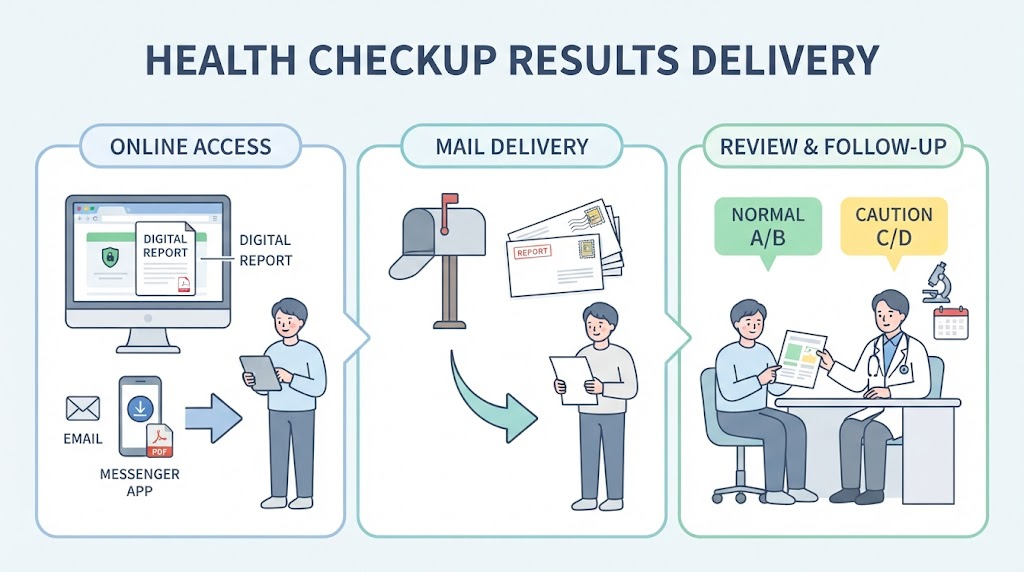
The Most Traditional Method: Receiving Result Reports via Mail and Email
For those who are not accustomed to checking via mobile apps or the internet, or who prefer to directly keep physical paper result notifications, receiving them via mail and email remains the most familiar method.
This traditional method, where elderly people or office workers who find digital devices inconvenient receive their results through their home or office, is still a popular means used by many. Let’s carefully examine the characteristics and pros and cons of mail and email receipt.
- Mail Receipt: Physical Result Reports Delivered to Home or Workplace
This is a method where the hospital where the check-up was received or the National Health Insurance Service prints the read result report and sends it to the address registered by the examinee.
Sender and Timing: Usually sent within 2 to 4 weeks after the completion of the check-up, and an additional 3 to 5 days may be required for mail delivery depending on the region.
Key Characteristics and Pros & Cons:
Intuitive storage: Since it arrives in the form of a physical booklet or report, it is good for directly binding it into a household document file and comparing changes every year in an analog way.
Risk of omission upon address change: If you have moved or your contact information has changed, but you have not updated the latest information with the National Health Insurance Service or the check-up institution, an accident may occur where the result report is delivered elsewhere or returned, failing to receive precious health information on time. (It is best to check your address before the check-up.)
- Email Receipt: Smart Document Method for Quick Receipt and Storage in PDF File Format
Introduced to supplement the slow delivery speed and risk of loss of paper mail, this channel has been preferred by many examinees recently.
Delivery Method: Securely encrypted PDF result notification reports are transmitted to the personal email address registered through the check-up institution’s computer system or the National Health Insurance Service service.
Key Characteristics and Pros & Cons:
Promptness and portability: You can receive them immediately into your email inbox right after reading is completed without waiting for mail delivery, and if you save them on your smartphone or PC, you can pull them out anytime, anywhere.
No risk of loss and permanent archiving: There is no worry about losing physical paper, and if you organize them by year in a computer folder, it is very convenient for long-term monitoring of health change trends.
Security password: For personal information protection, you must enter a security password such as your date of birth or the last digits of your mobile phone number when opening the PDF file, so you must be careful not to forget the password.
💡 Things to Check When Receiving via Mail or Email
Confirming recipient information status: You must check at least twice whether the address and email address entered in the questionnaire or personal information collection consent column written when registering for the check-up are accurate to prevent omission of the result report.
Caution regarding batch company receipt: In the case of office worker health check-ups, result reports are sometimes sent in bulk by mail to the company (human resources department). If you want to strictly protect your personal privacy, it is safe to change the receipt location to ‘home receipt’ or ‘personal email/mobile receipt’ when booking the check-up or filling out the questionnaire.
Then, what is the method of using the mobile app (‘The Health Insurance’) where you can check results in just 1 minute anytime, anywhere with just a smartphone, without needing to wait for mail or email? In the following content, we will guide you through the fastest and most convenient query method.

The Fastest and Most Convenient Method: Querying via Mobile App (‘The Health Insurance’)
Without having to wait days for mail to arrive or going through complicated PC authentication procedures, the fastest and most convenient way to check your health check-up results with just a smartphone is to use the National Health Insurance Service’s official mobile app, ‘The Health Insurance’.
As smartphone penetration has recently increased, let’s look into the specific procedures on how you can check your results through the ‘The Health Insurance’ app, which has established itself as a representative result check channel preferred by numerous examinees.
- Installing the ‘The Health Insurance’ App and Simple Authentication Login
This is the first step to use mobile civil petition services on your smartphone.
App download: Search for ‘The Health Insurance’ on the Google Play Store (Android) or Apple App Store (iOS) and install the official app for free.
Login procedure: Unlike the past, without needing to input complicated accredited certificate passwords, you can log in safely and quickly in just a few seconds through simple authentication (private certificates) or financial certificates that you frequently use, such as Kakao, Naver, or Toss.
- Step-by-Step Guide to Querying Health Check-up Results
After logging into the app, you can easily access your results through intuitive menus on the main screen.
- Entering the menu: Touch and select the ‘Health Check-up’ or ‘My Health Management’ menu from the app home screen.
- Selecting result inquiry: If you press the ‘Health Check-up Results Inquiry’ item, all general health check-up and cancer screening histories you have undergone through the National Health Insurance Service up to now are listed by year.
- Checking detailed results: If you select the check-up item for the corresponding year you wish to check, everything from basic measurement results such as blood pressure, blood sugar, and cholesterol levels to image reading opinions, and comprehensive judgments (normal A/B, caution, disease suspicion, etc.) immediately appears on your smartphone screen.
- Powerful Advantages Unique to Mobile App Inquiries
Comparison of health data over the past 10 years: You can compare last year’s results and this year’s results side by side on the screen or grasp trends in numerical changes at a glance in graph form, providing great motivation for health management.
PDF saving and sharing function: Beyond just viewing on your smartphone screen, it is very practical as you can download the result notification PDF file onto your smartphone or immediately share it via KakaoTalk and email to necessary places (such as when receiving treatment at another hospital).
💡 Tips When Using the Mobile App
Immediately after finishing a check-up, data analysis and reading may not be completed yet, so phrases like “No results found” or “Calculating health check-up results” may appear. Since you usually need to access it about 2 to 3 weeks after the examination to check the completed report tables, it is better to check with some leisure rather than querying too impatiently.
Then, besides the smartphone app, what is the method for checking results on the National Health Insurance homepage using a PC for a larger screen and meticulous detailed review? In the following content, we will guide you through a detailed PC usage guide.

Detailed Confirmation on PC: National Health Insurance Homepage Usage Guide
If you feel somewhat frustrated examining detailed health check-up results on a smartphone screen, or if you want to thoroughly review check-up reports on a larger screen and even print them out in an office work or document processing environment, using the National Health Insurance official homepage via PC (internet) is the most reliable method.
Through a wide monitor screen, let’s step-by-step examine the PC homepage usage guide where you can compare past check-up results and numerical changes by year at a glance, save them as official PDF documents, or print them out right away.
- Accessing the National Health Insurance Official Homepage and Logging In
Run a PC web browser (Chrome, Edge, Whale, etc.) and enter the official channel.
Site access: Search for ‘National Health Insurance’ or ‘National Health Insurance Civil Petitions Here’ on a portal site to access the official homepage.
Login progress: Click the [Login] button at the top of the homepage. Since it supports simple authentication methods such as Naver and Kakao as well as accredited certificates (formerly official certificates) and financial certificates, select the authentication method most convenient for you and safely complete the login.
- Navigating to the Health Check-up Results Inquiry Menu
Once login is completed, move to the result inquiry page through the main screen or civil petition service menu.
- Hover over or click [Civil Petitions Here] on the menu bar at the top of the homepage.
- Select the [Health Check-up] category from the sub-menu, and then enter the [Health Check-up Results Inquiry] menu. (Alternatively, you can access it directly from the personal civil petition integrated inquiry corner.)
- A clean table-format list by year of all health check-up histories (general health check-ups, cancer screenings, infant health check-ups, etc.) that you have undergone through the National Health Insurance Service appears on the screen.
- Checking Detailed Results and Saving/Printing as PDF
If you select the check-up history for a specific year you wish to check from the queried list, the detailed page opens.
Detailed numerical analysis: The normal range for each item such as blood pressure, fasting blood sugar, total cholesterol, liver function levels (AST, ALT, gamma-GTP), and kidney function is contrasted with your actual measured values and detailedly indicated.
Checking comprehensive opinions: Along with the doctor’s comprehensive judgment results, you can carefully read through prescription comments for lifestyle improvement and whether diseases such as high blood pressure, diabetes, and dyslipidemia are suspected on a large screen.
Printing and PDF downloading: If you press the [Print] or [Save] button located at the top or bottom of the page, you can immediately save a clean official health check-up result notification PDF file—flawless for submission to public offices or for personal archiving—to your computer or output it through a printer.
💡 Precautions When Using the PC Homepage
Disabling pop-up blocker settings: When the check-up report print or PDF download window opens, the window may not appear due to the web browser’s own pop-up blocker function. In this case, click the pop-up block notification appearing on the right side of the browser address bar, change it to ‘Always allow’, and try again to make it work normally.
Caution when using public PCs: If you performed inquiry and printing using a PC in a public place such as a company or library, you must log out and completely close the browser window after work is finished to protect personal information.
Then, what are the core figures that must be closely examined and the post-management tips to cope with when abnormal findings occur within the health check-up result reports received via mail, mobile, and PC? In the final content that follows, we will wrap it up perfectly.

Conclusion: Core Figures That Must Be Checked in the Result Report and Post-Management Tips
The health check-up report finally obtained in your hands or faced on the screen through mail, mobile apps, and the PC homepage. In front of densely written numbers and professional medical terms, there are often times when you feel at a loss as to where and how to look.
However, among the numerous items in the result report, core indicators containing the most decisive warning signals sent by your body are separately designated. Concluding with core figures that must be closely watched when you pick up the check-up report and post-management tips not to be missed when abnormal findings are discovered, let’s examine them.
- 4 Core Figures to Check First on the Result Report
If it is difficult to grasp every single item one by one, it is wise to first check the following four basic figures directly tied to metabolic syndrome and cardiovascular and cerebrovascular diseases.
Blood Pressure (Systolic / Diastolic): The normal standard is less than 120/80 mmHg. If it is continuously measured at 140/90 mmHg or higher, it is an early stage of hypertension, requiring dietary improvements and regular monitoring.
Fasting Blood Sugar: Blood sugar measured after fasting for 8 hours or more, with a normal range of less than 100 mg/dL. Between 100 and 125 mg/dL means a warning light is turned on for ‘impaired fasting glucose (prediabetes).’
Cholesterol and Triglycerides (Indicators of Dyslipidemia): Check total cholesterol, HDL, LDL cholesterol, and triglyceride levels. In particular, if LDL, known as ‘bad cholesterol,’ is high or triglyceride levels are elevated, it means a red flag has been raised for vascular health.
Liver Function Levels (AST, ALT, Gamma-GTP): These are indicators showing whether liver cells are damaged. If the figures come out high exceeding the normal range, you should check for causes such as heavy drinking, accumulated fatigue, or fatty liver.
- Customized Coping Methods According to Comprehensive Judgment Results (A–D)
On the front page or summary page of the checkup result report, a comprehensive judgment grading the examinee’s overall health status with an alphabet letter is recorded.
Normal A / Normal B: The current health status is good (A), or there are no major abnormalities but slight self-care and lifestyle habit correction are needed (B). You can steadily maintain your current health routine.
Caution (C) / Suspected Disease (D): This is the section you must look at most carefully. A ‘Caution’ finding means the relevant figure is on the borderline and requires management, while a ‘Suspected Disease’ judgment means findings of specific diseases such as hypertension or diabetes are observed, requiring additional detailed examinations.
- Post-Management Tips Not to Be Missed When Abnormal Findings Are Discovered
Revisiting a Nearby Hospital and Confirmatory Examination: Just because you received a ‘Suspected Disease’ or ‘Favorable Finding’ judgment does not mean you should be disappointed or neglect it. By bringing your national health checkup result report and ID and visiting a nearby hospital or clinic such as a general internal medicine department, you can link to confirmatory examinations (re-examinations) supported by the government for free or at a low cost to receive an accurate diagnosis.
Comparing Numerical Trends by Year: Do not look at just this year’s figure; compare it side by side with last year’s and the year before last’s results through the mobile app or PC inquiry function examined earlier. If the figures show a trend of steady continuous increase, starting dietary control and exercise in advance even if you are currently normal is the shortcut to true health management.
A health checkup is not the end, but a new starting point to accurately grasp the current address of your body and draw future health maps. We cheer for you to become a wise examinee who protects a lively and healthy daily life through meticulous result verification and swift post-management.
Korean version: 한국어로 읽기