
1. Checking the National Tomorrow Learning Card Expiration Date and Identifying the Expiration Timing
Are you successfully continuing your self-development after receiving the National Tomorrow Learning Card? Knowing exactly when the expiration date is from the day the card was issued is a very important first step to enjoying government support benefits without interruption.
Many people are often flustered when they think the card can be used permanently once issued, or when the expiration date passes quickly without them realizing it. Then, how can you identify your card’s expiration date and timing?
The easiest and most accurate method is to run the **’Goyong24′ app** on your smartphone or access the **official Goyong24 website (work24.go.kr)** on your PC. After logging in, go to the **[My Page]** menu in the upper right corner and select the **[National Tomorrow Learning Card] > [Card Information Inquiry]** item, and you can check the exact issuance date and **expiration date** of your currently held card at a glance.
Another method is to directly examine the expiration month and year (MM/YY) embossed on the front of the physical card you carry in your wallet.
💡 Expiration Timing Tip:
The basic expiration period of the National Tomorrow Learning Card is **5 years from the date of issuance**. However, since the expiration period or support limit may vary depending on an individual’s support eligibility changes or specific conditions, it is safe to access My Page in advance and check the remaining expiration period if there is a lecture you intend to take!
2. Renewal Application Eligibility and Requirements Checkpoints by Target Group
Just because the expiration date of your National Tomorrow Learning Card is approaching does not mean it is automatically renewed or that anyone can get a reissuance. If you want to renew, you must carefully review the requirements that match your current employment status and qualification conditions once again.
Based on the latest 2026 standards, we will easily organize the renewal application eligibility and key checkpoints by target group!
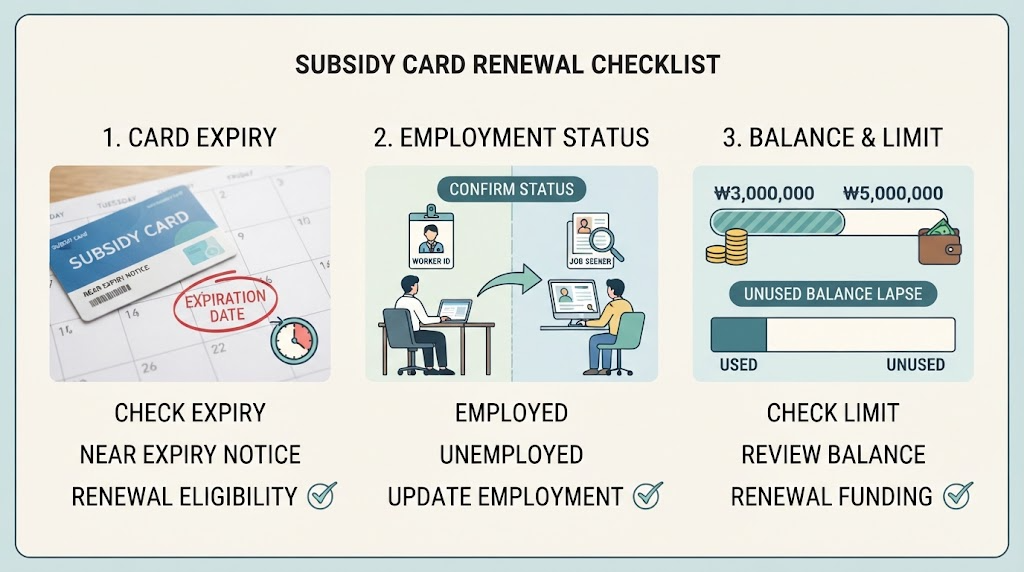
① Check for Those Whose Existing Card Expiration Date is Imminent
Eligibility to apply for renewal (reissuance) is granted only to those whose card expiration date is approaching or has already expired. Since advance inquiry is usually possible from 2 to 3 months before expiration, you must be careful not to miss the timing.
② Re-verification of Support Eligibility by Employment Status such as Employee and Unemployed
Unlike when you first received the card, the screening criteria required for renewal may vary depending on whether you are currently employed, unemployed and looking for work, or corresponding to self-employed workers or special-type workers (special employment workers), etc. It is essential to check whether your current employment status is accurately reflected through the Goyong24 system.
③ Check Income Standards and Support Limit Balance
The National Tomorrow Learning Card basically grants a support limit of 3 million KRW to 5 million KRW for 5 years, but requirements for additional support or re-granting may vary depending on income levels or participation history. Since the balance that was not fully used by the expiration date is extinguished and not carried over, you must check the criteria by target group to see if a new support limit applies upon renewal.
💡 Renewal Eligibility Check Tip:
During the qualification screening process, employment insurance subscription history or income proof documents may occasionally fail to link automatically. Before applying for renewal, please check in advance through the National Health Insurance Service or National Tax Service to see if your employment and income-related information is well maintained in the latest state!

3. Online Renewal Application Procedure Guide Through Goyong24 (HRD-Net)
If the expiration date of your National Tomorrow Learning Card is approaching, you can easily and quickly apply for renewal online through your smartphone or PC without having to visit an offline center amidst your busy daily life.
Based on the latest 2026 Goyong24 (HRD-Net) system, we will guide you step-by-step through the practical online renewal application process that can be completed in just a few clicks!
Step 1: Access the Goyong24 Official Website and Log In
Launch the ‘Goyong24’ app on your smartphone or access the official Goyong24 website (work24.go.kr) through a PC web browser.
Click the [Login] button in the upper right corner and securely log in using your own joint certificate, financial certificate, or simple authentication (Naver, KakaoPay, etc.).
Step 2: Enter the [National Tomorrow Learning Card] Menu and Select [Renewal/Reissuance Application]
After logging in, click the [National Tomorrow Learning Card] item at the top of the main screen or in the My Page menu.
Select the [Card Renewal Application] or [Reissuance/Renewal] menu from the sub-menu or main guide banner to enter the application page.
Step 3: Enter Personal Information and Employment Status, Then Check Renewal Eligibility
Carefully check the basic personal information and your current employment status (employee, unemployed, self-employed, etc.) displayed on the screen, and modify or enter necessary items.
The system automatically queries your employment insurance subscription history and eligibility requirements in real-time to determine whether you are eligible for renewal.
Step 4: Select Card Issuer and Complete Application
Select the affiliated card company to use after renewal (Shinhan Card, Hana Card, etc.) and the delivery method (home delivery or bank visit pickup).
After agreeing to the final application terms, click the [Apply] button to finally complete your online renewal submission.
💡 Online Application Tip:
Since notification talks regarding the progress and screening results will be sent to the contact number you entered during the renewal application, please make sure to recheck that it is a number where notifications can be smoothly received, and be sure to check the final screen to see if a normal submission number has been issued after completion!
4. Required Documents and Precautions When Applying for Renewal by Visiting the Local Employment Center Offline
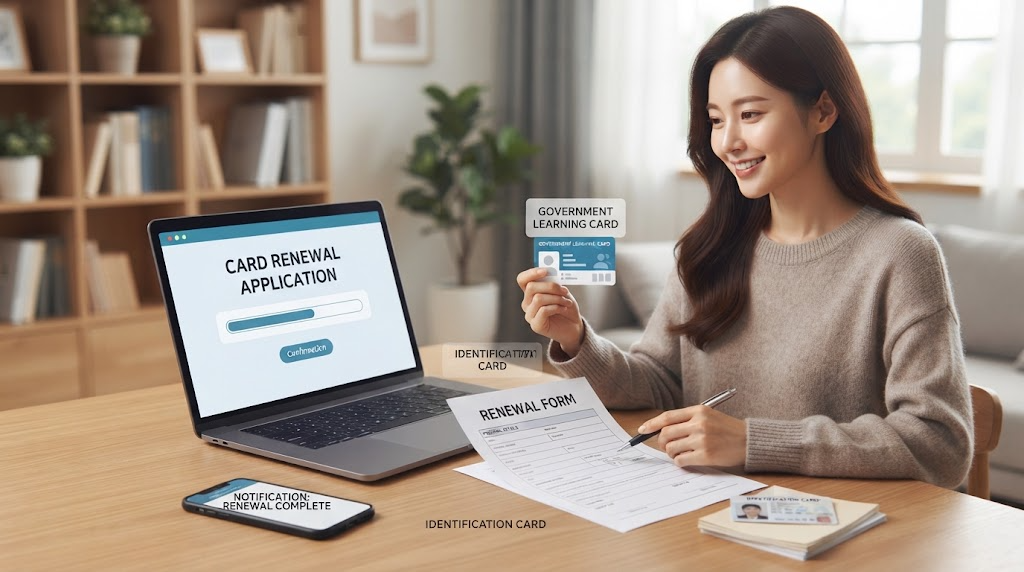
If online application is unfamiliar or errors occur because qualification proof documents are not automatically linked in the system, you can directly visit your local employment center of jurisdiction to proceed with the renewal application for the National Tomorrow Learning Card.
We will organize the essential documents you must bring and the precautions you must know before visiting when proceeding with renewal through an offline visit!
① Essential Prepared Items and Documents for Offline Visits
– **ID Card:** You must bring one of the following for identity verification: a resident registration card, driver’s license, or passport.
– **National Tomorrow Learning Card Renewal (Issuance) Application Form:** You can fill out the form provided in the employment center’s civil petition room directly on-site, or download the form in advance from the Goyong24 website and bring it filled out.
– **Employment and Income Proof Documents (If Necessary):** Depending on your individual employment status (employee, unemployed, special-type worker, etc.) or recent income fluctuation details, additional proof documents such as a certificate of employment, withholding receipt for earned income, or business closure certificate may be required, so it is safe to check with your local center by phone before visiting.
② Precautions to Always Keep in Mind When Applying via Visit
– **Check Advance Visit Reservations or Operating Hours:** Employment centers operate from 9:00 AM to 6:00 PM on weekdays, and there may be many waiting people right before lunchtime (12:00 PM – 1:00 PM) or in the late afternoon. Whenever possible, visit during morning hours or inquire with Goyong24 or your local center before visiting to avoid congestion.
– **Proxy Application by Others Not Allowed:** Since National Tomorrow Learning Card renewal can only be applied for under your own name, it is fundamentally impossible for family members or others to visit and apply on your behalf, even if there are unavoidable circumstances.
💡 Offline Visit Tip:
Before visiting the employment center, make sure to accurately check which employment center has jurisdiction over your place of residence before setting out. Sometimes people make a wasted trip because their jurisdiction differs from a nearby employment center, so we recommend searching for the location in advance through the Goyong24 customer center or website!

5. Frequent Mistakes During the Renewal Process and How to Handle Approval Delays
After finishing the National Tomorrow Learning Card renewal application, thinking everything is fine, unexpected document omissions or system errors frequently cause approvals to be delayed or rejected.
We will point out the top 3 most frequent mistakes during the renewal process and how to wisely handle situations when approval is delayed!
① TOP 3 Frequent Mistakes
– **Mismatch in Employment Status and Income Information:** Applying for renewal immediately after changing jobs or resigning, resulting in a screening error because the information is not reflected in real-time in the employment insurance system.
– **Misunderstanding the Expiration Timing:** Applying anxiously and getting rejected either long after the card has already expired or, conversely, when several months remain until the expiration date. (Applications usually go smoothly from 2 to 3 months before expiration.)
– **Affiliated Card Company Selection Error and Failure to Link Account in Own Name:** Applying for renewal with a different card company than the one previously used, leading to incorrect direct debit account information entry or connection to someone else’s account, which halts approval.
② Approval Delay Handling Methods and Resolution Guide
– **Real-Time Check of Progress Status on Goyong24 My Page:** Screening typically takes about 3 to a maximum of 7 days after submitting a renewal application. You must frequently check whether your current application is under ‘Received’, ‘Under Review’, or ‘Supplementation Required’ in Goyong24 [My Page] > [My Civil Petition Processing Status].
– **Prompt Submission of Additional Documents Upon Supplementation Request:** If the responsible officer requests additional proof documents during the review process (supplementation requested), you must upload the missing documents through the Goyong24 system as soon as you check the notification talk or text message to prevent approval delays.
– **Direct Inquiry to Local Employment Center or Customer Center:** If a week or more passes without any particular contact or if the processing status is stuck, calling the Ministry of Employment and Labor Customer Center (without area code, 1350) to directly inquire about the progress and request prompt processing is the surest method.
💡 Renewal Handling Tip:
If you apply for renewal hastily to match a looming training course start date, review delays may cause you to miss course registration. Get into the habit of starting the renewal process with plenty of time, at least one month before the card expiration date!
Korean version: 한국어로 읽기