Introduction: Why Should You Check Health Checkups and National Health Insurance in Advance?
📋 Introduction: Why Should You Check Health Checkups and National Health Insurance in Advance?
Around this time every year, you might suddenly tilt your head and wonder, “Was I eligible for a health checkup this year?” And whenever job transitions, loan screenings, or year-end tax settlement seasons approach, it is not uncommon to be caught off guard by sudden requests to submit a National Health Insurance Qualification Acquisition/Loss Confirmation Letter or Payment Confirmation Letter.
Health checkups and health insurance inquiries are administrative procedures that come up in our daily lives much more often than we think, but when the time actually comes, it can often feel overwhelming to figure out where and how to access them. Let us break down why you should check them out in advance and why it matters.
- Why Postponing Your Health Checkup Can Cost You
General health checkups and cancer screenings supervised by the National Health Insurance Service will expire if they are not completed within the designated period (usually December 31st of the current year).
Preventing the Year-End Rush: Especially between October and December, checkup reservations surge, making it extremely common to be unable to book on your preferred date or find that checkup facility reservations are fully booked.
Opportunities for Early Detection: For busy modern individuals, a health checkup is the bare minimum safety device that allows you to catch the warning signs of your body most quickly and accurately.
- Why Is Submitting Various Documents and “Health Insurance Inquiries” Essential?
As you go about social and professional life, there are actually far more occasions than you might expect when you need to submit verification documents.
Employment and Job Transitions: The “National Health Insurance Qualification Acquisition/Loss Confirmation Letter” to prove career history at a previous workplace or current status.
Finance and Loans: The “National Health Insurance Premium Payment Confirmation Letter” requested by banks for income verification or employment confirmation.
Welfare Benefits and Year-End Tax Settlement: Applications for various government subsidies and verification of tax benefits.
To ensure you can immediately issue these important documents whenever needed, it is vital to build a habit of checking in advance what type of subscriber you are registered as and whether your payment history is normal.
💡 Tip: By using the National Health Insurance Service website or mobile app, you can resolve this entire process in just 3 minutes using only a simple authentication or digital certificate.
In the next section, we will take a step-by-step look at how to safely and quickly access and log in to the National Health Insurance Service website!

How to Access and Log In to the National Health Insurance Service Website
We have written the main content for the second subheading of the Naver blog post. It has been neatly organized step-by-step so that readers can easily follow along.
📋 How to Access and Log In to the National Health Insurance Service Website
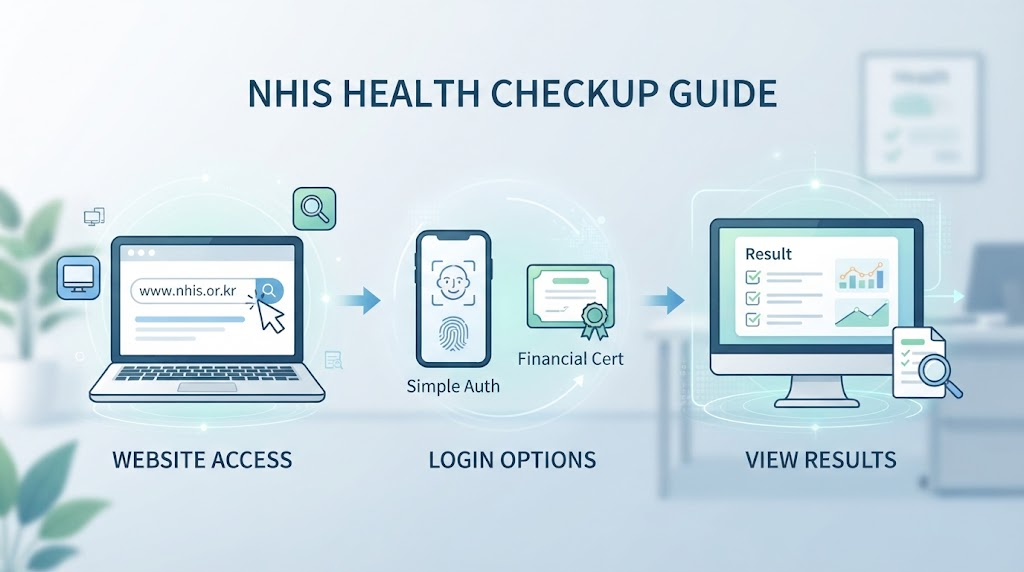
From checking health checkup eligibility to issuing various certificates, the starting point for all tasks is accessing and logging in to the National Health Insurance Service website. While both PC and mobile can be used easily, today we will look closely at the PC website usage method, which serves as the primary standard.
- Accessing the Official National Health Insurance Service Website
Search for “National Health Insurance Service” or “National Health Insurance” in the search bar of a portal site (such Naver) and access the official website.
🔗 Address Tip: Entering www.nhis.or.kr directly into the address bar is the safest way to connect without risks like phishing sites.
- Finding and Navigating to the Login Menu
Click the [Login] button located in the upper right corner of the main screen or near the main menu. Since the National Health Insurance Service website supports various login methods for personal civil petitions, you can easily use it simply through identity verification without any complicated separate membership registration.
- Selecting the Most Convenient Login Method for You
Unlike the past, you don’t have to suffer headaches from installing public certificate programs, as it supports convenient authentication and financial certificates as follows, making things very convenient.
Simple Authentication (Recommended): You can log in within 1 minute using private certificates you frequently use on your smartphone, such as KakaoTalk, Naver, PASS, Toss, and PAYCO. After requesting authentication, simply tap approval on your smartphone and you’re done.
Financial Certificate: If you have a financial certificate issued by a bank, you can safely store it in your browser and log in easily.
Joint Certificate (Formerly Public Certificate): This is the traditional method of loading a certificate (public certificate) file stored on a PC or USB and entering a password to log in.
💡 Blog Tip Summary
If it’s your first visit or if additional PC environment installation programs are cumbersome, using ‘Simple Authentication (Naver/Kakao, etc.)’ is the fastest and most stress-free method!
In the next section, we will take a detailed look at ‘How to Check My Health Checkup Eligibility and Results’, which you should check first after logging in.
[Core 1] How to Check Your Health Checkup Eligibility and Results
📋 [Core 1] How to Check Your Health Checkup Eligibility and Results
Now that you have finished logging in, it is time to check in earnest whether you are eligible for a health checkup this year. On the National Health Insurance Service website, you can view not only general health checkups but also national cancer screenings and infant health checkup eligibility at a glance.
- How to Check Health Checkup Eligibility (PC Standard)
You can easily navigate through the main screen of the Service website or the Civil Petitions Here menu.
- Menu Selection: Click the [Health In] menu at the top of the homepage or the [Health Checkup Eligibility Inquiry] icon on the main screen.
- Eligibility Verification: When you access the page, your checkup eligibility for the year appears in a table format along with eligibility by category, such as general health checkups, cancer screenings, and infant checkups.
- Writing a Questionnaire (Advance Preparation): Filling out the ‘Health Checkup Questionnaire’ on the website in advance before visiting the checkup facility is very convenient as it can drastically reduce waiting time at the hospital.
- Finding Designated Checkup Facilities Suited for You
Once you have finished checking your eligibility, you need to find hospitals and clinics around you where you can receive a checkup.
Checkup Facility Search Path: Navigate in order through the top menu of the homepage: [Health In] ➡️ [Health Checkup] ➡️ [Find Checkup Facility/Hospital].
Regional and Category-Specific Search: Select your region (city/county/district and neighborhood) and check the specific cancer screening items you need to take, such as stomach cancer, colorectal cancer, or breast cancer, and a list of designated hospitals where those checkups are available will be displayed along with a map.
💡 Tip: Since reservations fill up quickly at the end of the year (November–December), we recommend picking a few hospitals from the list in advance, making a phone reservation, and then visiting.
- How to Check and View Past Health Checkup Results
Those who say, “I got a checkup last year, but I lost my results sheet,” don’t need to worry. You can view it again as an electronic document at any time.
Result Inquiry Path: Select the menu [Health In] ➡️ [My Health Management] ➡️ [Health Checkup Result Inquiry].
What You Can Check: You can compare and check general health checkups, oral checkups, infant checkup results from recent years, and trends in numerical changes for blood pressure, blood sugar, cholesterol, etc. at a glance.
If needed, you can download or print the [Health Checkup Result Notification] as a PDF, making it great to use as a health management diary.
💡 Checkpoint
To avoid putting it off until the end of the year and failing to get your checkup even though you are eligible this year, check your eligibility in advance when things are unhurried in the first half of the year and schedule your dates!
In the next section, we will look into ‘How to Issue and Check Health Insurance Qualification and Payment Confirmation Letters’, which are essential for various employment, loan, and administrative procedures.

[Core 2] How to Issue and Check Health Insurance Qualification and Payment Confirmation Letters
We have written the main content for the fourth subheading of the Naver blog post, ‘How to Issue and Check Health Insurance Qualification and Payment Confirmation Letters’. We have cleanly organized the issuance methods for the documents that are most commonly used in daily life.
📋 [Core 2] How to Issue and Check Health Insurance Qualification and Payment Confirmation Letters
One of the reasons people visit the National Health Insurance Service website as frequently as for health checkups is precisely for issuing various certificates. Make sure you know the issuance methods for two representative documents so you won’t wander around when needed for company submission, loan screening, or year-end tax settlement.
- An Essential Item for Employment, Job Transitions, and Career Verification: The ‘National Health Insurance Qualification Acquisition/Loss Confirmation Letter’
This is a document that allows you to prove at a glance whether you are currently an employee subscriber (or regional subscriber) and your work history of which companies you worked at in the past.
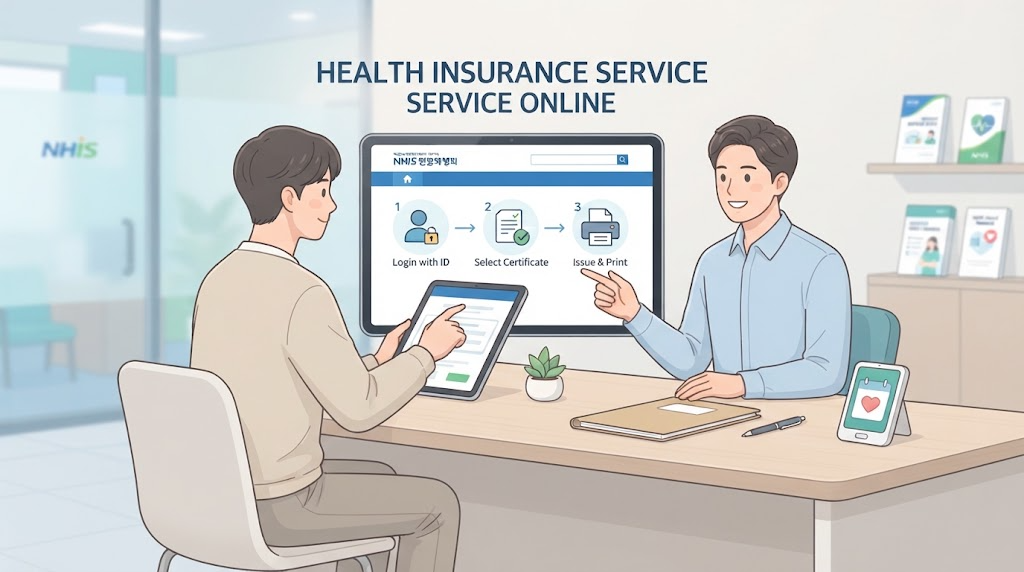
Issuance Path: Navigate through the top menu of the homepage in order: [Civil Petitions Here] ➡️ [Personal Civil Petitions] ➡️ [Qualification Acquisition/Loss Confirmation Letter].
Inquiry and Printing Method:
After identity verification (which links immediately if you are logged in), select whether to disclose your resident registration number.
Select your entire employment history or a specific workplace and click the [Inquiry] button.
After checking the details on the screen, you can easily submit by choosing your preferred method among [Print Issuance], [Fax Transmission], or [Electronic Document Wallet].
- ‘Health Insurance Premium Payment Confirmation Letter’ for Financial, Loan, and Income Verification
This is the document most frequently submitted when you need to prove your income and insurance premium payment history for bank loans or to government offices.
Issuance Path: Navigate through the top menu of the homepage in order: [Civil Petitions Here] ➡️ [Personal Civil Petitions] [Health Insurance Premium Payment Confirmation Letter].
Inquiry and Printing Method:
Specify the year (attributed year) or monthly period you wish to receive.
Check whether it is a 4 major public insurances integrated collection history or a health insurance standalone history, then inquire.
Select either the [Korean] or [English] certificate suited for your purpose, and proceed with print output, PDF saving, or fax transmission.
💡 Blog Tip Summary
Don’t panic if you don’t have a printer! Nowadays, it is much more convenient to receive issuance immediately via an Electronic Document Wallet (Naver, Kakao, etc.), or download it as a PDF through the mobile app and share it with the submitting agency via email or KakaoTalk.
In the next section, we will wrap up ‘How to Utilize the ‘The Health Insurance’ Mobile App’ for those who find PCs inconvenient!
If PCs are Difficult? How to Utilize the ‘The Health Insurance’ Mobile App
📋 If PCs are Difficult? How to Utilize the ‘The Health Insurance’ Mobile App
Is transferring public certificates to a PC cumbersome, or do you want to finish everything right on your smartphone without needing printer output immediately?
With just ‘The Health Insurance’, the official mobile app provided by the National Health Insurance Service, you can resolve everything from health checkup eligibility inquiries to certificate issuance and insurance premium payments right in the palm of your hand without even turning on a PC.
- Installing and Running ‘The Health Insurance’ App
You can easily download it from the app store according to your smartphone’s operating system.
Download Method: Search for ‘The Health Insurance’ in Google Play Store (Android) or App Store (iOS) and install the official app.
Login: Just like on PC, it supports simple authentication (Kakao, Naver, etc.) and financial certificates, so upon initial login, a single smartphone authentication gives you quick access.
- Representative Core Functions Available via Mobile App
You can directly use the services you want through intuitive menu icons on the app main screen.
Checking Health Checkup Eligibility and Results:
You can immediately check if you are eligible for a health checkup this year, and conveniently complete past checkup results and questionnaire writing right on your smartphone screen.
Instant Certificate Issuance and Fax Transmission:
You can instantly obtain frequently needed documents such as the Health Insurance Qualification Acquisition/Loss Confirmation Letter and Payment Confirmation Letter on mobile.
Especially even without a printer, by using the ‘Fax Transmission’ function and simply entering the submitting office’s number, you can send a fax right away, making it a highly recommended feature for office workers.
Insurance Premium Inquiry and Payment:
You can check your monthly outgoing health insurance premium details in real time, and immediately pay via smartphone if there are any unpaid amounts.
💡 Blog Tip Summary
Need to submit documents to a government office or bank but don’t have a printer? Turn on the ‘The Health Insurance App’, look up the required documents, use the fax transmission function, or issue them to your electronic document wallet to share with the person in charge. You can save much more time and money!
In the final next section, we will neatly summarize today’s content along with essential tips you must know when using health checkups and health insurance inquiries.

Conclusion: Be Sure to Keep Track of Easy-to-Miss Health Checkup Periods!
📋 Conclusion: Be Sure to Keep Track of Easy-to-Miss Health Checkup Periods!
Through the National Health Insurance Service website and mobile app, we have thoroughly explored everything from checking health checkup eligibility to issuing health insurance qualification acquisition/loss and payment confirmation letters.
It is not as complicated as you might think, and you can resolve it in just a few minutes at home with simple authentication, which is truly convenient, right?
💡 Summary of Today’s Key Points and Closing Request
- Health Checkups in Advance: Every year-end (October–December), reservations surge, making it difficult to receive them on your desired date. If you are an eligible recipient, book in advance during the first half of the year or when you have spare time to take care of your health!
- Certificates Easily via Mobile and PC: When you urgently need a qualification acquisition/loss confirmation letter or payment confirmation letter, even without a printer, make active use of the ‘The Health Insurance’ app’s fax transmission function or electronic document wallet.
We hope you smartly utilize National Health Insurance Service services to save time and thoroughly take care of your precious health as well.
If today’s post was helpful, please show your support with a like (❤️), comments, and adding us to your neighbors, and we will return with more useful and enriching living information. Thank you!
Korean version: 한국어로 읽기